A character counter looks like the simplest tool on the web, yet two counters will often give different numbers for the same text. The differences come from decisions: is a space a character, is a hyphenated word one word or two, is an emoji one character or two? This guide explains what each figure in our Character Counter means, shows the exact numbers it gave for awkward inputs, and says where the figure may not match what a social network, an SMS gateway or a search engine will count.
All the counts quoted below were read from the tool after typing the example text into it.
Using the counter
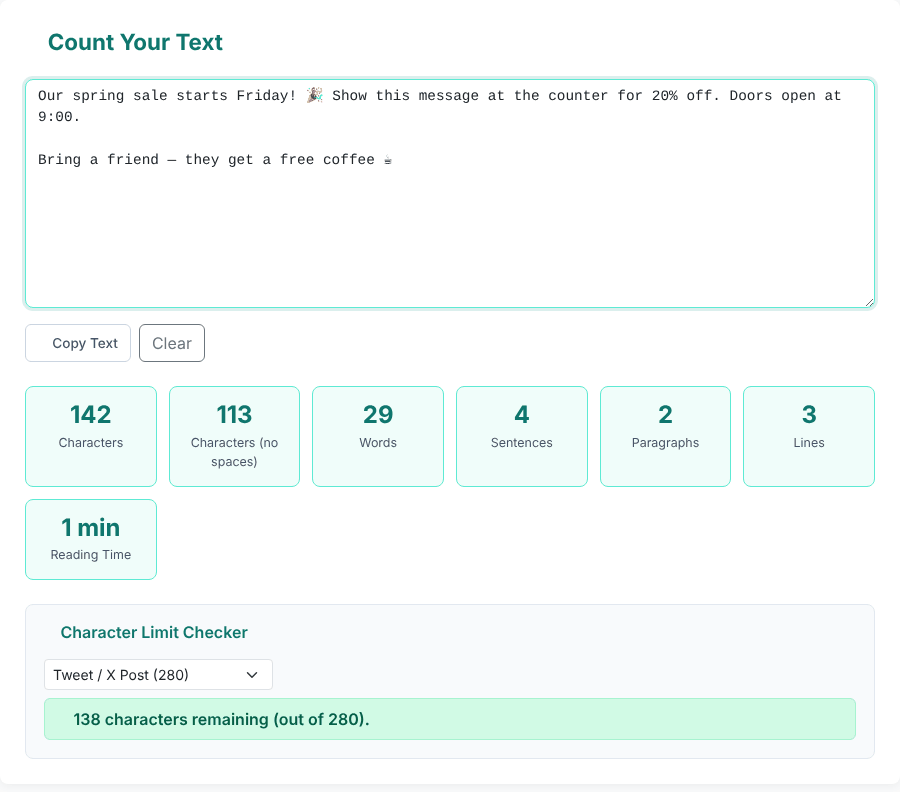
- Type or paste into the large box. The seven figures underneath update on every keystroke; there is no button to press.
- Optionally pick a limit in the Character Limit Checker (a platform preset or Custom...) to see how many characters remain or how many you are over.
- Copy Text copies the contents of the box to the clipboard and Clear empties it.
The page does not save your text. If you reload the tab, the box is empty again, so copy anything you want to keep.
What each number means
- Characters is the length of the text as the browser stores it: letters, digits, punctuation, spaces, tabs and line breaks each count. (Emoji are a special case, covered below.)
- Characters (no spaces) removes every whitespace character, which includes spaces, tabs, line breaks and non-breaking spaces, and counts what is left.
a b <tab> chas 14 characters and 3 without spaces. - Words splits the text wherever there is whitespace and counts the pieces.
- Sentences counts the pieces left after splitting at one or more of
.,!or?that are followed by whitespace or the end of the text. - Paragraphs counts blocks of text separated by at least one blank line. A line that holds only spaces counts as blank.
- Lines is the number of line breaks plus one, blank lines included.
- Reading Time is the word count divided by 200 words per minute, rounded up, shown as whole minutes.
What counts as a word
Because words are "whatever sits between whitespace", the results follow from that rule:
Hello world                                   2 words
well-known state-of-the-art e-mail don't it's 5 words
Visit https://example.com/a?b=1&c=2 now       3 words
1,000 words & 25% — fine / ok                 8 words
word—word word — word 4 words- Hyphenated compounds and contractions are one word each, so
state-of-the-artcounts once. - A whole URL is one word.
- A standalone symbol surrounded by spaces counts as a word. In the fourth line,
&,—and/each added one, giving 8 where a reader would say 5. An em dash with no spaces (word—word) joins the neighbours into a single word. - Extra spaces, tabs and blank lines do not create empty words:
a b <tab> cis 3 words. - A non-breaking space separates words (
a<nbsp>bis 2 words), but a zero-width space does not (a<zero-width space>bis 1 word and 3 characters).
Word processors make their own choices about symbols and hyphens, so expect a small difference when you compare with one. If you need word frequencies rather than a total, the Word Frequency Counter is the right tool.
Emoji, accents and other scripts
This is where the tool's number is least like what a person sees. Characters are counted in the units the browser uses for text, and a single emoji can take several of them:
😀 2 characters
👍🏽 (thumbs up + skin tone) 4
🇮🇩 (flag) 4
👨👩👧👦 (family) 11
é typed as one character 1
é as e + combining accent 2
Hi 😀 there 👍🏽 ok 19 characters (16 code points, 15 visible symbols)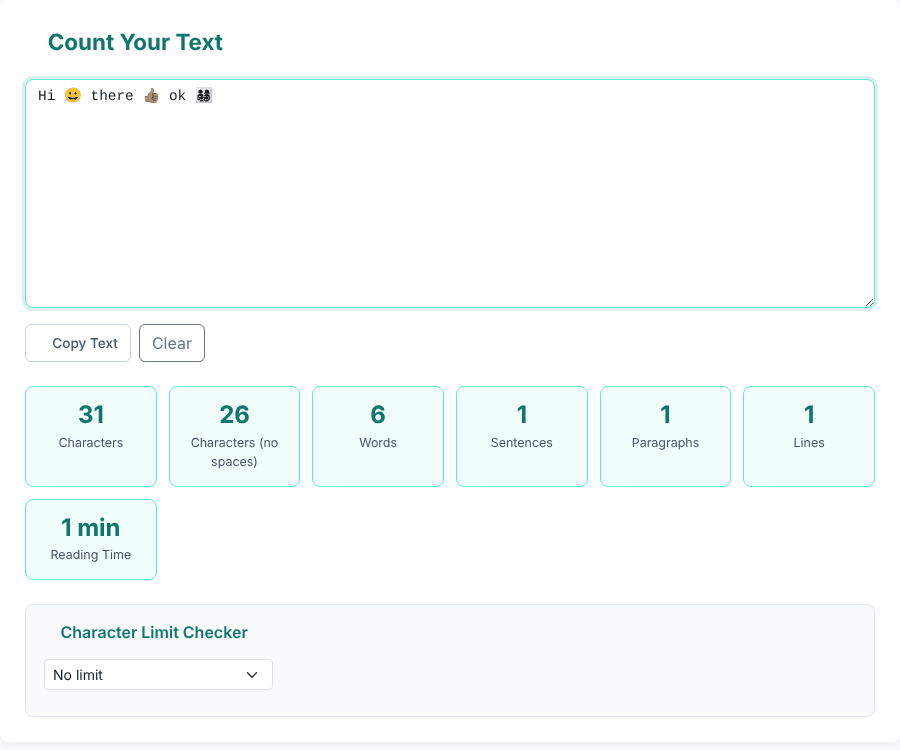
Other results from the same test:
- Standalone emoji are words.
Hi 😀 there 👍🏽 okcounts as 5 words. - Chinese and Japanese text is not split into words.
你好世界,今天天气很好。gave 12 characters and 1 word;こんにちは世界gave 7 characters and 1 word. Those scripts do not use spaces between words, so the word count is meaningful only for text that does. The character count is the useful number. - The full-width full stop is not a sentence end. That Chinese sentence ends with
。and was counted as 1 sentence regardless of how many it contains. - Thai
สวัสดีครับcounted 10 characters, which includes the vowel and tone marks that are not separate visible letters. - Arabic counted normally:
مرحبا بالعالمis 13 characters and 2 words.
The practical consequence is that for emoji-heavy or non-Latin text the number here can be higher than the number of symbols you can see. Platforms that count visible symbols or apply their own weighting will show a different figure, so use this count as an estimate there.
Sentences, paragraphs and lines: the edge cases
The sentence count is a simple pattern match, not a language parser. A full stop followed by a space ends a sentence, whatever came before it:
Hello world. How are you? Fine!                              3 sentences
Wait... what?! Really?!? Yes.                                4 sentences
Pi is 3.14159 and v2.0.1 is out. Dr. Smith said e.g. this.   4 sentences
The third line is really two sentences. Decimal numbers and version numbers are safe (the dot has no space after it), but Dr. and e.g. each split the sentence. Repeated punctuation such as ... or ?! counts once.
For paragraphs and lines:
Para one./ blank /Para two./ a line of spaces /Para three./ three blank lines /Para four.gave 4 paragraphs and 9 lines. Any number of blank lines between blocks counts as one break.- A single line break between two lines does not start a new paragraph.
- A trailing line break adds a line:
abcfollowed by Enter shows 2 lines. - Text made only of three line breaks shows 0 words, 0 paragraphs and 4 lines.
Reading time moves in steps: exactly 200 words shows 1 min, 201 words shows 2 min, 401 words shows 3 min, and 1,000 words shows 5 min. Anything from 1 word up shows at least 1 min. It is a rough average, not a measure of how fast you or your audience read.
The Character Limit Checker
The dropdown has six presets plus a custom value: Tweet / X Post (280), SMS Message (160), SEO Meta Title (60), SEO Meta Description (160), Instagram Caption (2200) and Custom.... The result line changes colour and wording as you approach the limit:
- Green: more than 10% of the limit is left, for example
138 characters remaining (out of 280). - Amber: 10% or less is left, including exactly zero. At the 280 limit that starts at 252 characters (28 remaining); 251 characters is still green.
- Red: over the limit, for example
1 characters over the limit of 280.The tool uses the plural even for one character.
The check uses the same Characters figure shown in the first tile, so emoji count as above: 140 smiley faces exactly fill the 280 limit (0 characters remaining) and 141 give 2 characters over the limit of 280.. The Custom... box has a minimum of 1 in its markup, but a typed negative value such as -3 is accepted and produces 14 characters over the limit of -3. for an 11-character text; enter a positive number.
Treat the presets as guides rather than guarantees:
- Social posts. A platform may count emoji, links or non-Latin characters differently from this tool. Its own composer is the final authority.
- SMS. The 160 figure belongs to messages that use the basic GSM character set. A message with emoji or many non-Latin characters is generally split into shorter segments, commonly of 70 characters. The tool applies a flat 160 and does not detect the character set.
- Search results. Search engines shorten titles and descriptions according to the width they take on screen, not an exact character count, so 60 and 160 are rules of thumb.
Large and unusual input
We pasted 900,000 characters (a 45-character sentence repeated 20,000 times) and the tiles showed 900,000 characters, 720,000 without spaces, 180,000 words, 20,000 sentences, 1 paragraph, 1 line and a reading time of 900 min. Numbers are shown with thousands separators. We did not test files at the multi-megabyte level; at that size your browser's memory is the limit.
Privacy
The counting runs in your browser and the tool has no code that stores or sends your text. We checked by watching network requests while typing and pasting: after the page had loaded, none were made. The page loads Bootstrap and an icon font from a public CDN when it opens, and the site may show ads from third-party networks that run separately from the tool, so do not paste passwords or other secrets.
Quick answers
Should I use "with spaces" or "without spaces"? Use the one named by whoever set the limit. If it does not say, assume spaces count, since platforms usually count them.
Why is my count higher than the number of symbols I see? Emoji and some scripts use more than one unit per visible symbol, as shown above.
Why is my word count different from Word or Google Docs? Each program makes its own choices about symbols, hyphens and dashes; this tool splits only on whitespace.
Does it count Chinese or Japanese words? No. It reports those scripts as one word per run of text without spaces. Use the character count.
Can I fix the case of my text afterwards? Yes, the Case Converter handles upper, lower, title and sentence case, and the Reading Time Calculator can estimate time at a different pace.
Want to check the length of your text?
Open the Character Counter