There is no single correct way to turn XML into JSON. XML has attributes, mixed text and elements, comments, namespaces and ordering that JSON has no direct place for, so every converter invents conventions. What matters is knowing yours. This guide documents exactly what our XML to JSON Converter does, from tests with feeds, attribute-heavy records and awkward markup, including the inputs where it loses information, so you can decide when it is the right tool and how to handle the result in code.
The conventions it uses
The converter parses your XML with the browser's built-in XML parser and builds a JSON object from the element tree. These are its rules:
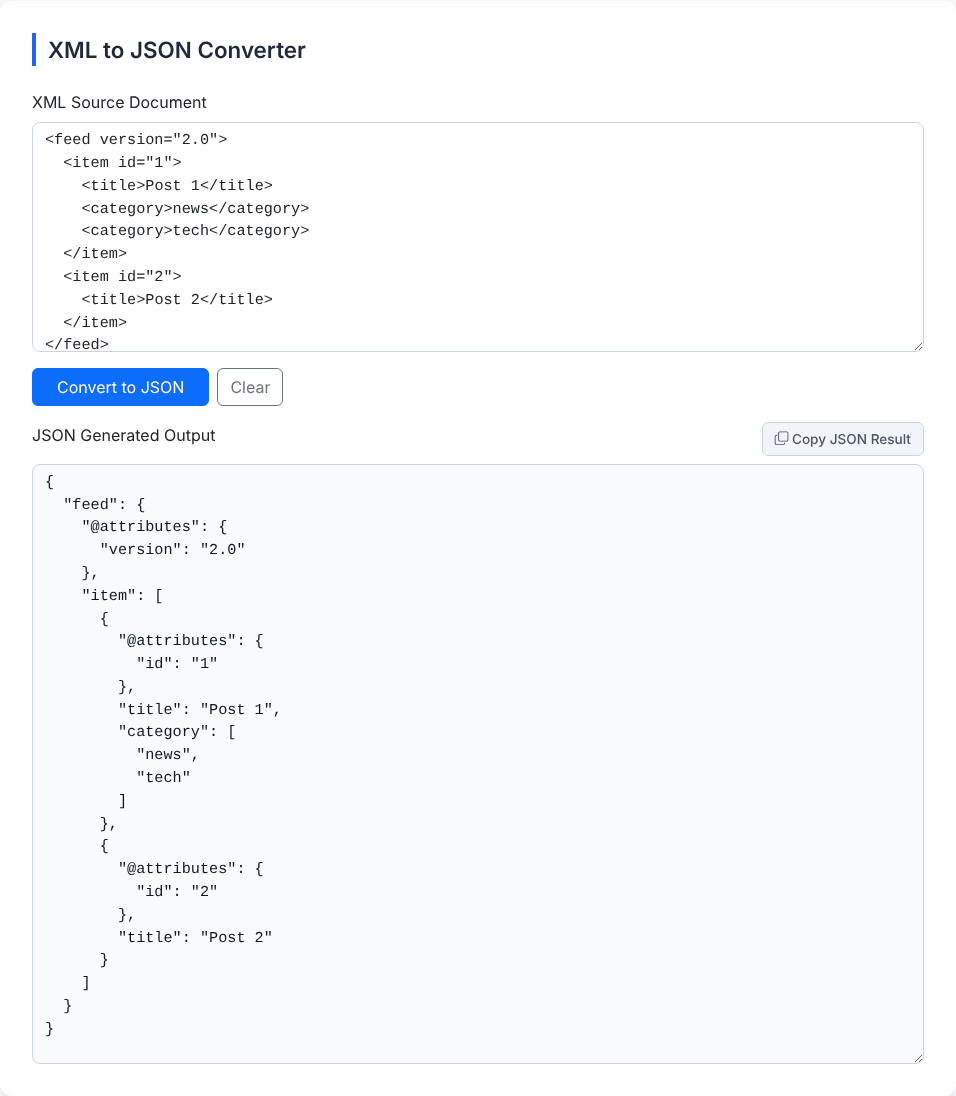
- The root element becomes the single top-level key.
<root>...</root>becomes{"root": ...}. - A child element becomes a key. An element containing only text becomes a plain string:
<user>Alice</user>becomes"user": "Alice". - Attributes go under an
"@attributes"key inside the element's object.<book id="b1" lang="en">gives"@attributes": {"id": "b1", "lang": "en"}. - If an element has attributes and text, the text is stored under
"#text":<price currency="USD">9.99</price>gives{"@attributes": {"currency": "USD"}, "#text": "9.99"}. - Repeated elements with the same name become an array. Three
<book>children give"book": [ ... ]. - Every value is a string.
<n>42</n>gives"42",<t>true</t>gives"true", and<z>007</z>keeps its zeros as"007". Numbers and booleans are never guessed. - Empty elements become an empty string.
<b/>,<c></c>and an element containing only a space all give"". - Text is trimmed at both ends, but line breaks and spacing in the middle of a value are kept.
How to convert, step by step
- Paste your XML into XML Source Document. An XML declaration at the top, a DOCTYPE line and processing instructions are all accepted (and ignored in the output).
- Click Convert to JSON.
- Copy the result from JSON Generated Output with Copy JSON Result. The output is always indented with two spaces.
Entities are decoded on the way through: & becomes &, < becomes <, and numeric references such as © and 😀 become © and the emoji. An attribute value of x & y comes out as "x & y". Non-Latin text (日本語, José) passes through unchanged, and a byte order mark at the very start is tolerated.
The single-versus-repeated trap
The rule that causes the most bugs downstream is how arrays appear. A list only becomes an array when the element repeats. Compare these two inputs:
<library><book><t>A</t></book><book><t>B</t></book></library>
  gives  "book": [ {"t":"A"}, {"t":"B"} ]

<library><book><t>A</t></book></library>
  gives  "book": {"t":"A"}
The same field is an array when there are two books and an object when there is one. Code written against the first sample (data.library.book.map(...)) throws on the second. The usual defence is to normalise on the consuming side. In JavaScript:
const books = [].concat(data.library.book ?? []); // always an array, even when absentThe same applies to repeated simple values: the two <category> elements in the screenshot became ["news", "tech"], but a feed item with only one category would give a plain string. If the consumer needs a stable shape, either normalise as above or use a converter that lets you declare which elements are always lists, which this tool does not.
Inputs where information is lost
Most XML used for data (feeds, records, configuration) converts cleanly. XML used for documents does not, and some real-world cases fail silently. We found these by testing:
Mixed content loses everything after the first text. An element that starts with text and then contains child elements is reduced to that first piece of text:
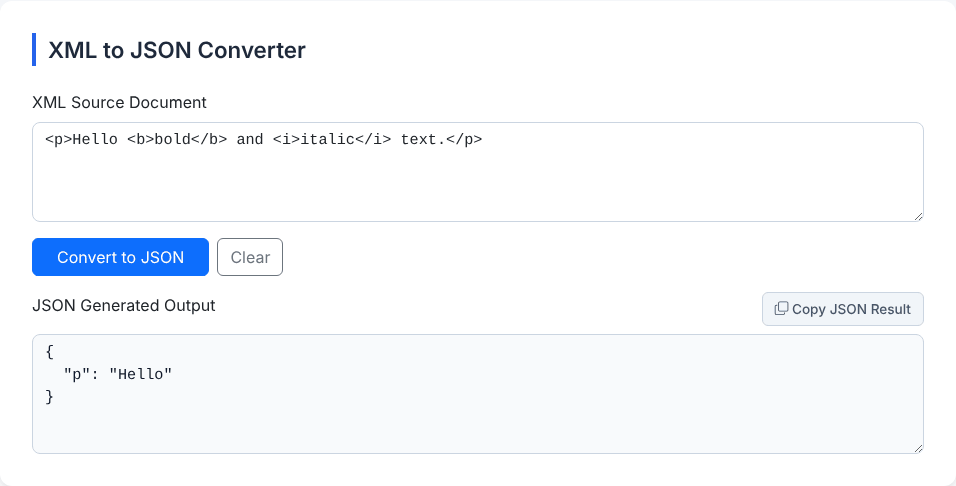
The input <p>Hello <b>bold</b> and <i>italic</i> text.</p> gave {"p": "Hello"}. The bold text, the italic text and the trailing text are all dropped, and no error is shown. The same happens to <p>one<br/>two</p>, which gives "one". If an element has attributes, text and child elements together, the pieces of text survive under "#text" (as an array when there are several), but the position of each piece relative to the child elements is lost. This tool is therefore the wrong choice for HTML-like or prose-like XML (XHTML, DocBook, rich text exports).
CDATA content is lost. A CDATA section is a common way to hold markup or special characters inside a value, for example in RSS descriptions. <note><![CDATA[5 < 6 & <b>tag</b>]]></note> gave {"note": {"#cdata-section": null}}. The text is replaced by null. If your source uses CDATA, remove the wrapper first (turning the content into ordinary escaped text) before converting.
Comments leak in as nulls. <a><!-- hi --><b>1</b></a> gave {"a": {"#comment": null, "b": "1"}}. The comment text is dropped but a "#comment" key remains. Strip comments before converting if you want a clean object.
Order between different element names is not preserved as such. The result is an object, so elements are grouped by name. Two interleaved sequences like a, b, a end up as a: [first, second] then b.
Have XML you need as JSON?
Open the XML to JSON ConverterNamespaces, declarations and other markup
Namespace prefixes are kept literally as part of the key, and the xmlns declarations appear as ordinary attributes. A SOAP-style envelope converted like this:
{
  "soap:Envelope": {
    "@attributes": { "xmlns:soap": "http://schemas.xmlsoap.org/soap/envelope/" },
    "soap:Body": {
      "m:GetPrice": {
        "@attributes": { "xmlns:m": "https://example.com/p" },
        "m:Item": "Apple"
      }
    }
  }
}
Keys such as "soap:Body" are awkward to use with dot notation (you need data["soap:Envelope"]["soap:Body"]), and the namespace URIs are not resolved, so two documents that use different prefixes for the same namespace give different keys. If you control the producer, avoid prefixes; if you do not, plan on bracket access. The XML declaration, a DOCTYPE and processing instructions such as <?xml-stylesheet ... ?> are ignored.
One more edge: if an element has both an attribute and a child element of the same name, such as <a type="x"><type>y</type></a>, the output keeps them apart: the attribute lives under "@attributes" and the child is "type": "y".
Reading the error messages
XML is strict: a single mistake makes the whole document unreadable. When that happens the tool shows Translation Suspended: followed by the browser's own message, which in Chromium-based browsers begins This page contains the following errors: and ends with Below is a rendering of the page up to the first error. The useful part is in the middle. These are the ones we triggered:
- Mismatched tags in
<a><b>text</a>:error on line 1 at column 15: Opening and ending tag mismatch: b line 1 and a. You closedawhilebwas still open. - Two root elements in
<a/><b/>:Extra content at the end of the document. XML allows one root. If you have several records, wrap them in a parent element. - A bare ampersand in
<a>5 & 6</a>:xmlParseEntityRef: no name. Write&. This is the most common error with hand-edited XML and copied web text. - An unquoted attribute in
<a x=1/>:AttValue: " or ' expected. Attribute values need quotes in XML, unlike in HTML. - Text where an element should start (plain
hello, or junk before the first tag):Start tag expected, '<' not found. The same message appears when there is a declaration but no root element.
Other browsers word these messages differently, but the causes are the same. If your JSON side is the problem instead, see the JSON Formatter, and for the opposite direction use the JSON to XML Converter. Do not expect the two tools to round-trip: attributes go out as @attributes here, and that name is not understood on the way back.
Privacy
The parsing uses your browser's own XML parser and runs locally. We watched the network while converting several documents, and no requests were made after the page loaded. The page loads styling from a public CDN when it opens, and may show third-party advertising; neither receives your XML from our code. As with any website, strip credentials and personal details from configuration files before pasting them. Your last 20 conversions are kept in your browser's local storage (the first 500 characters of each input) until you press Clear All.
Quick answers
Why are all my numbers strings? XML has no number type, so the converter does not guess. Convert the fields you need in your code, for example with Number(value).
Can I change the @attributes and #text names? No. They are fixed.
Does it handle large files? The tool's code sets no limit. Large documents are limited by browser memory, and the whole result is placed in a text box, so very large files will be slow. A command-line or library-based converter suits big batches.
Is the output valid JSON? Yes, it is produced by JSON.stringify. You can check it with the JSON Formatter if you like.
Have XML you need as JSON?
Open the XML to JSON Converter