The Eisenhower Matrix sorts tasks using two questions that are often confused: is it urgent? and is it important? The four possible answers give four boxes, each with its own default action. Our Eisenhower Matrix Task Board is a four-quadrant board where you type tasks, place them in a quadrant and drag them around as your view changes. This guide explains how the board works, how to decide where a task belongs, and what the tool does and does not do.
The four quadrants
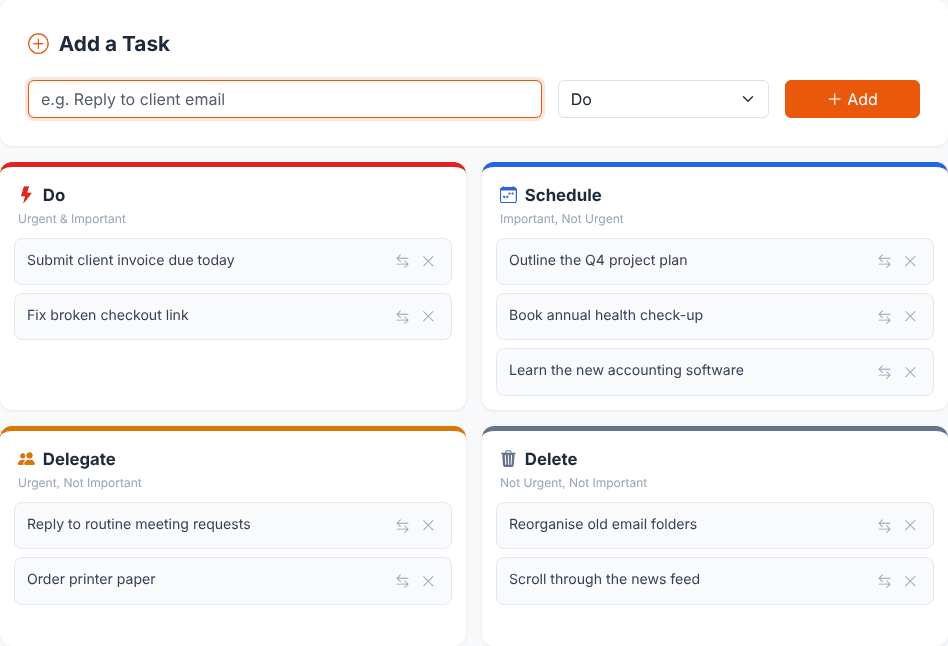
The board labels each quadrant with the action first and the criteria underneath. These are the exact labels on the page:
- Do (Urgent & Important): needs your direct attention now.
- Schedule (Important, Not Urgent): matters, but nothing forces it to happen today. Put it on a calendar.
- Delegate (Urgent, Not Important): has to happen soon, but it does not need you in particular.
- Delete (Not Urgent, Not Important): on reflection, not worth the time.
The tool's "What Is the Eisenhower Matrix?" tab says the method is often attributed to a line reportedly said by US President Dwight D. Eisenhower: "What is important is seldom urgent, and what is urgent is seldom important." We have not traced the original wording or occasion, so treat the attribution as a popular one rather than a verified fact. The two-question sorting stands on its own merits either way.
How to decide: urgent versus important
The method breaks down when the two questions are merged. A practical way to keep them apart:
- Urgent asks about time: does something happen if this is not done soon? A deadline today, a person waiting, a service that is down.
- Important asks about value: does this move forward something you actually care about, such as a goal, a client relationship, your health or your finances?
Notifications and other people's requests feel urgent by default, which is why many tasks that arrive by message or email belong in Delegate rather than Do. A useful check is to ask what would be lost if the task waited a week. If the answer is "nothing" and the task is not valuable, it is a Delete candidate. If the answer is "nothing yet, but it would hurt later", it is a Schedule task. Tasks in Schedule often turn into Do tasks later simply by being ignored until the deadline, which is the main reason to give them a place on the board.
Using the board step by step
- Type a task in the text box under "Add a Task". The box has a 120-character limit; we pasted 200 characters and it kept 120.
- Choose a quadrant in the drop-down next to it (Do, Schedule, Delegate or Delete). The default is Do. The drop-down keeps your last choice, so you can add several tasks to one quadrant in a row.
- Press Enter or click Add. The card appears at the bottom of that quadrant and the text box is cleared and focused again. A blank or whitespace-only entry is ignored without a message.
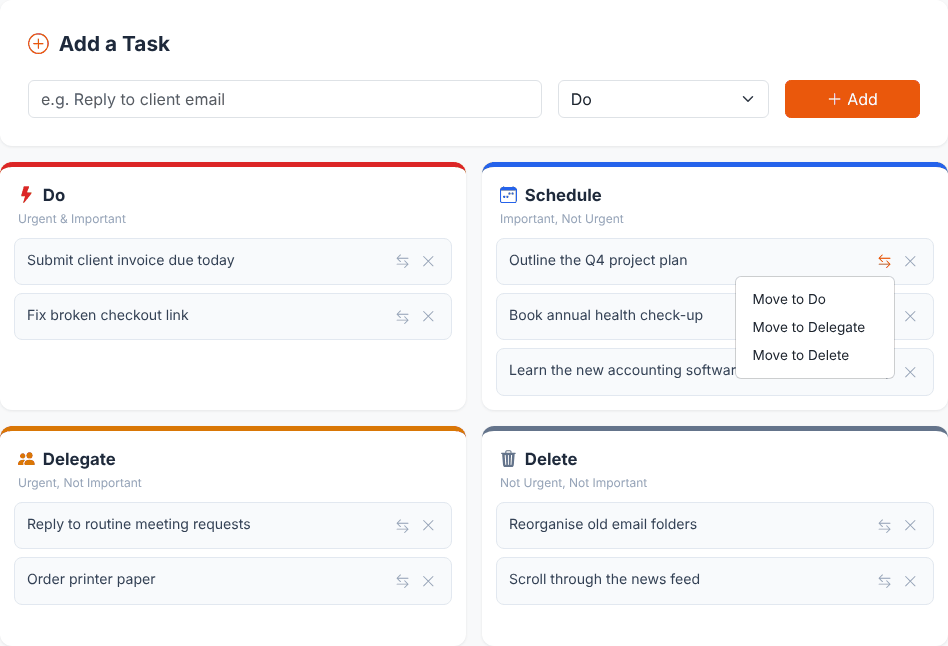
- Move a card by dragging it to another quadrant, or by clicking the arrows icon on the card and choosing "Move to Do", "Move to Schedule", "Move to Delegate" or "Move to Delete". The tool says touch devices can use that button instead of dragging.
- Remove a card with the X icon on it.
Sort your own task list
Open the Eisenhower Matrix Task BoardA worked example
Here are nine tasks sorted in the screenshot above. The reasoning matters more than the placement:
Do        Submit client invoice due today        (deadline today, money at stake)
          Fix broken checkout link               (customers affected now)
Schedule  Outline the Q4 project plan            (valuable, no one is waiting)
          Book annual health check-up            (important, easy to postpone forever)
          Learn the new accounting software      (pays off later)
Delegate  Reply to routine meeting requests      (time-sensitive, anyone can do it)
          Order printer paper                    (needs doing soon, not your skill)
Delete    Reorganise old email folders           (no consequence if skipped)
          Scroll through the news feed           (not a task)
Three things to notice. First, only two of nine tasks need immediate action, which is typical when you sort honestly. Second, the Schedule tasks have no date on the board itself, so the matrix tells you that they need time, not when. Move them into a calendar or work blocks afterwards. Third, Delete is not only for tasks you drop for good; it also catches habits that disguise themselves as tasks.
To review, you can then work top to bottom: clear Do, put dates on the Schedule items, pass on the Delegate items and remove the Delete cards. The tool does not track completion, so remove a card when it is done (or move it to Delete).
Keeping the matrix honest over time
- Review on a rhythm. A Schedule task becomes urgent as its deadline approaches. Move it to Do when that happens, and look at which Do tasks only became urgent because they waited.
- Watch the size of Do. If most of your cards are in Do, either the sorting is too generous or there is a planning problem upstream. Try to move tasks left to Schedule earlier.
- Be specific. "Marketing" cannot be done in one sitting. "Draft the newsletter intro" can, and fits on a card.
- Delegating needs a person. Moving a card to Delegate does not message anyone. It only reminds you to hand the work to someone, or to decide not to do it.
Compared with other methods, the matrix is a sorting tool rather than a daily plan. If you already know what matters today and mostly need focus, a timer such as the Pomodoro Timer may be a better next step. If you need to count down to a deadline, use the Interactive Countdown Timer.
Where your tasks are saved
The tool says tasks are saved on this device only. We checked the code and tested it:
- Each change is written to your browser's local storage under the key
eisenhower-matrix-tasks-v1. We added, moved and removed tasks, reloaded the page and the board came back as we had left it. - Each task is stored with an id, the text, its quadrant and a creation time.
- The board is not synced. It is not shared between phone and laptop, or between two browsers on one computer.
- Clearing site data, using a private window or switching browsers means an empty board. The tool has no export or backup option, so copy anything important somewhere else.
- If the stored data cannot be parsed, the board starts empty. We put the text "not json" into the storage key and the page loaded with no tasks.
- If the browser blocks storage, the board still works but is not kept after you close the page. The code catches the storage error without showing a message (we read this in the code and did not test it).
The tool does not send your tasks to a server. In its code the only request is the optional feedback form in the Contact tab. In our test session the page made no requests other than loading its own files and the Bootstrap library. The site's pages load Bootstrap from a public CDN and may show advertising, which is separate from the board.
What the tool does not do
- No editing: the text of a card cannot be changed after you add it. Remove it and add it again.
- No due dates, reminders, tags or completion checkbox.
- No manual order inside a quadrant. Cards are ordered by when they were first added, and a card keeps that position after you move it to another quadrant.
- No confirmation or undo when you press the X icon.
- No duplicate check. Adding "Fix production outage" twice gives two cards.
- No accounts or sharing. It is a personal board in one browser.
Task text is shown as plain text. We entered <b>bold</b> & <img src=x onerror=alert(1)> as a task and it appeared on the card exactly as typed, with no formatting and no script running.
Quick answers
Is the Eisenhower Matrix free to use here, and do I need an account? There is no sign-up. You open the page and start adding tasks.
How many tasks can I add? The tool sets no limit in its code. Your browser's storage limits still apply, which we did not test.
Can I move a card on a phone? Yes, use the arrows icon on the card, which opens the "Move to..." menu. We tested the menu in a desktop browser. The tool itself recommends it on touch devices.
Why is the Schedule quadrant the one to protect? Because nothing forces it. Do and Delegate items have somebody or something pushing them; Schedule items only get done if you put time aside, for example by adding them to a calendar.
Sort your own task list
Open the Eisenhower Matrix Task Board