Text copied from a web page can carry more than words: HTML tags if you copied the source, entities such as , curly quotes, non-breaking spaces and invisible characters. When you paste it into an AI chat, all of that is part of what gets read and counted. The Clean Text Converter strips the markup and tidies the characters, then shows how many characters and tokens were saved.
This guide explains what each of its four options really does, with measured results, and covers the places where the cleanup removes more than you would want. The tool's name in our menu is "Markdown to LLM Clean Text Converter", but, as the tests below show, the page cleans web text and does not remove Markdown symbols.
How to use it
- Paste the copied text, or raw HTML, into Paste Web Content.
- Check the four switches under What to Clean: HTML Tags & Entities, Smart Quotes & Dashes, Invisible Characters and Excess Whitespace. All are on by default.
- Read the Savings card: characters before and after with a percentage, and tokens before and after.
- Copy the Clean Text, or Download .txt (saved as
clean-text.txt). Clear empties the input.
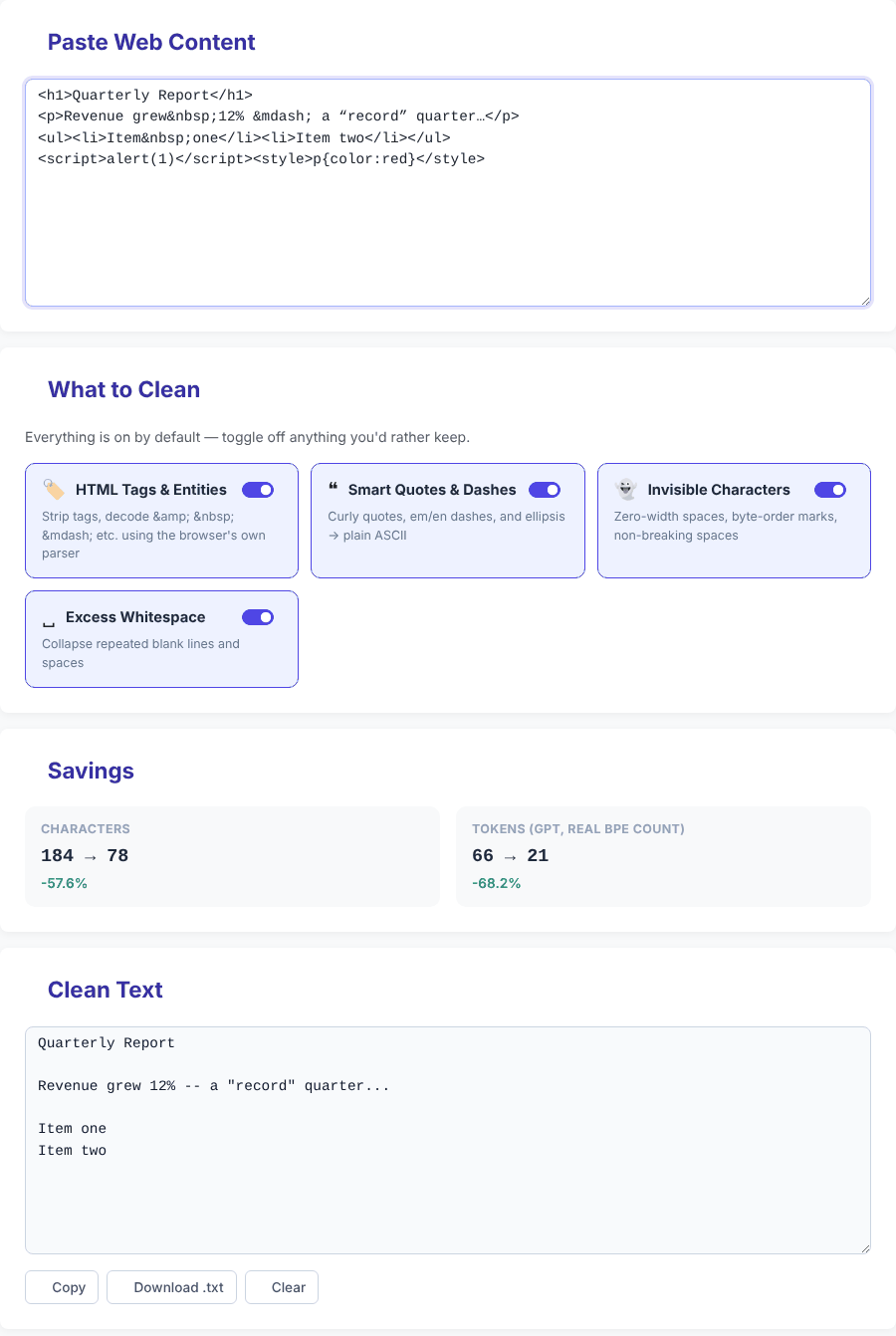
The snippet in the screenshot, as pasted and as returned:
<h1>Quarterly Report</h1>
<p>Revenue grew 12% — a “record” quarter…</p>
<ul><li>Item one</li><li>Item two</li></ul>
<script>alert(1)</script><style>p{color:red}</style>Quarterly Report
Revenue grew 12% -- a "record" quarter...
Item one
Item twoThe page recalculates a quarter of a second after you stop typing. The Savings card appears once there is text, and says no reduction when the result is not shorter.
Preparing text for an AI chat?
Open the Clean Text ConverterHTML Tags & Entities
The tool does not use pattern matching to remove tags. It hands your text to the browser's own HTML parser, in a way that never renders the markup: pasted scripts and event handlers such as onerror do not run and images are not downloaded. The parser keeps the text that comes out, which copes with sloppy real-world markup better than a find-and-replace would. Before reading the text back it removes <script> and <style> elements, and inserts a line break in front of paragraphs, headings, list items, table rows, <div> and <br>. What we observed:
Tom & Jerry <3 © 2026 €5 — 😀 &unknown; AT&T
  =>  Tom & Jerry <3 © 2026 €5 -- 😀 &unknown; AT&T

before<!-- hidden comment -->after          =>  beforeafter
line one<br>line two<br/>line three       =>  three lines
<table>...A | B / C | D...</table>          =>  AB / CD
<span>one</span><span>two</span>           =>  onetwo
<a href='http://x.com'>link text</a>      =>  link text
Photo: <img src='...' alt='A cat'> end => Photo: end- Named and numeric entities are decoded, including
😀to an emoji. An unknown name such as&unknown;and a bareAT&Tare left alone. - Table cells run together. Cells in a row are joined with no space (
AandBbecameAB), although rows are put on separate lines. Look at tables before you send them on. - Adjacent inline elements run together because no space exists between them in the source.
- Link addresses and image descriptions are lost. You keep the link text; the URL and the image's
alttext are dropped. - List markers are not added. A numbered list
<ol><li>First</li><li>Second</li></ol>came out asFirstandSecondon separate lines, without 1 and 2. - Preformatted text loses its layout.
<pre> indented\n code</pre>becameindented\n code(see Excess Whitespace below).
Angle brackets in ordinary text are kept
Only real HTML (known tags such as <p>, <div class="x"> or <b>, comments, and Word-style tags like <o:p>) is removed. A less-than sign that does not start a recognised tag is treated as plain text, so placeholders, generic types and comparisons survive:
Dear <Name>, contact <john@example.com> or List<String> and a<b
  =>  Dear <Name>, contact <john@example.com> or List<String> and a<b

if (a<b && c>d) { x = "<tag>"; } 5 < 10 and 10 > 5
  =>  unchanged
The check is by tag name, so a made-up element such as <custom-el> is also kept as text, while a placeholder that happens to be a real tag name (for example <b> or <i>) is still removed. If your text is code or a template that contains real tag names, switch HTML Tags & Entities off.
Smart Quotes & Dashes
This option converts a short list of typographic characters. It is not a general "convert everything to ASCII" filter:
“ ”  ->  "        ‘ ’  ->  '        —  ->  --        –  ->  -        …  ->  ...        •  ->  -

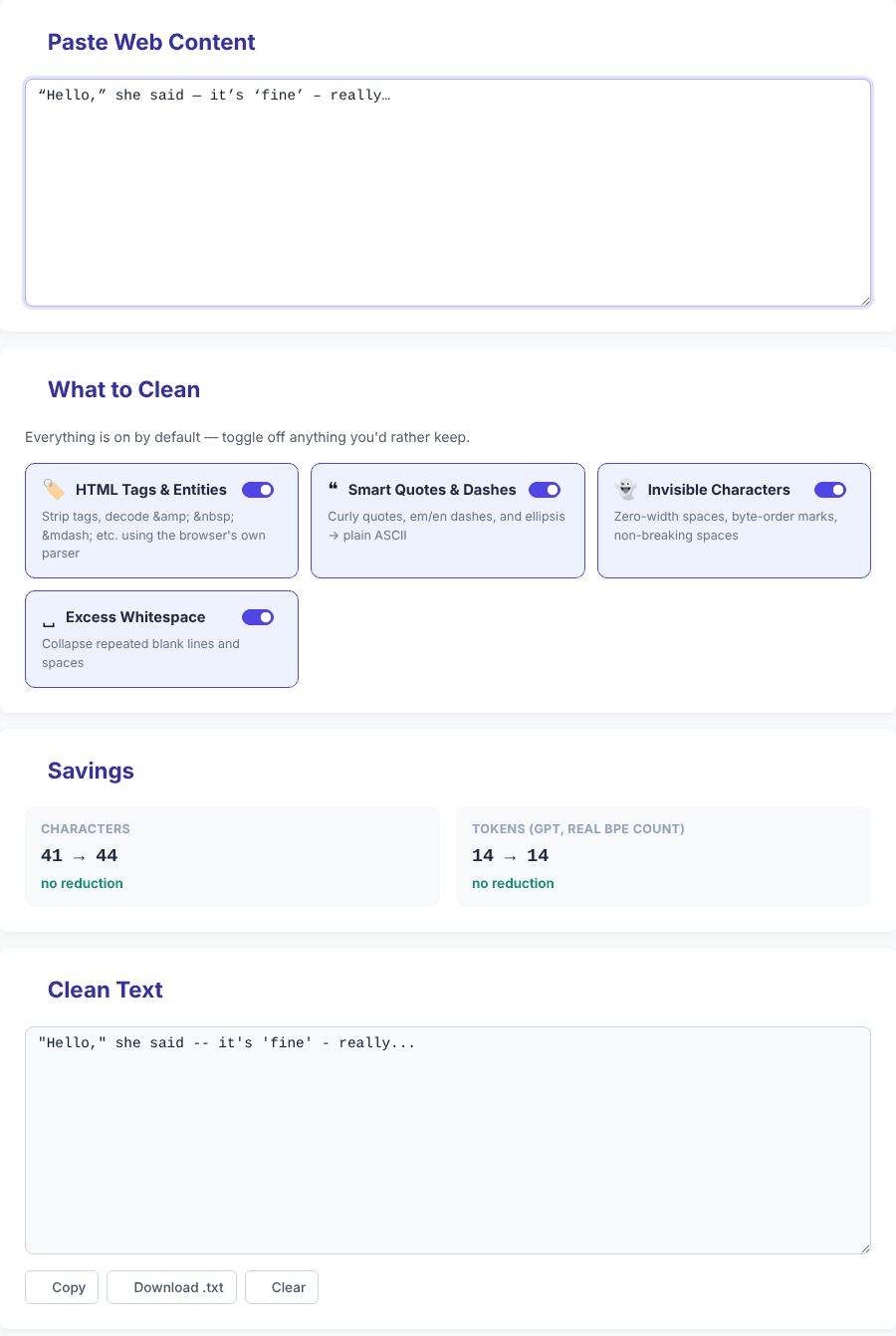
“Hello,” she said — it’s ‘fine’ – really…
  =>  "Hello," she said -- it's 'fine' - really...
Other characters are left as they are: I’m 5′ tall − 2 × 3 → ok became I'm 5′ tall − 2 × 3 → ok, with the prime, the minus sign, the multiplication sign and the arrow unchanged, and accented letters, Japanese text and emoji pass through untouched.
One result is worth knowing if you are using the tool to save tokens: this option saves none on its own. In the example above the text grew from 41 to 44 characters (an em dash became two hyphens and the ellipsis became three dots), and the token count stayed at 14 before and after. When we checked individual characters with the same tokenizer, a curly quote, an em dash and an ellipsis each counted as one token, exactly like their plain replacements. The conversion is useful when the destination only accepts plain ASCII quotes, but it is not where token savings come from.
Invisible Characters
The option deletes four specific characters: zero-width space (U+200B), zero-width non-joiner (U+200C), zero-width joiner (U+200D) and the byte-order mark (U+FEFF). It also turns a non-breaking space (U+00A0) into a normal space. A test string with all four zero-width characters between the letters a to e, followed by a non-breaking space and an f, came out as abcde f.
Two things to be aware of:
- Other invisible characters survive. The word joiner (U+2060), the soft hyphen (U+00AD), the left-to-right mark (U+200E), the narrow no-break space (U+202F), the em space (U+2003) and the ideographic space (U+3000) were all still present after cleaning. So the tool does not remove every invisible Unicode character, whatever its short description on the page may suggest.
- The zero-width joiner and non-joiner are meaningful in some text. The joiner is what glues emoji together:
👨👩👧👦 family(a family emoji, 18 characters) came out as four separate emoji👨👩👧👦 family(15 characters). The non-joiner is part of correct spelling in some languages: the Persianمیخواهمcame out asمیخواهم. If your text contains emoji sequences or Persian, switch this option off.
Excess Whitespace
This collapses each run of spaces or tabs on a line into one space, removes spaces at the end of lines, reduces three or more line breaks to two, and trims the start and end of the text. a b<tab><tab>c became a b c, and an x and a y separated by three non-breaking spaces became x y once the Invisible Characters option had converted them.
The same rule applies to indentation at the start of a line, which is why code is damaged: four spaces of indent became one.
for i in range(10):
    print(i)


    if x:
        pass
=>
for i in range(10):
 print(i)

 if x:
 pass
For Python, YAML or anything else where indentation carries meaning, turn Excess Whitespace off (and probably HTML as well).
What it does not do
- It does not strip Markdown.
**bold** and `code` and [link](http://x.com)and a# Headingline came through unchanged. For asterisks, hashes and backticks use the ChatGPT Formatting Cleaner. - It does not remove boilerplate such as menus, cookie notices or newsletter prompts. Copy just the part you need.
- It does not fix ligatures or other lookalike characters from PDFs, since they are not on the lists above. We did not test PDF or Word copies specifically.
- It cannot restore structure such as list numbers, table columns and link addresses once they have been dropped.
How the token figure works
The token numbers come from an in-browser implementation of the cl100k_base encoding (the gpt-tokenizer package, version 2.9.0), which the page loads from a public CDN. The count is exact for that encoding. Other models use different tokenizers, so the same text can produce a different count elsewhere; treat the figure as a good indicator of how much shorter the text became, not as a bill. For a model-by-model view, use the AI Token Counter. If the tokenizer script cannot load, for example when you are offline, the token boxes show a dash while the character figures still work.
Where do the savings come from? In our tests almost entirely from HTML markup: the 184-character snippet above dropped from 66 to 21 tokens, a 68% fall, whereas plain text with curly quotes saved nothing. Savings scale linearly: a 330,000-character text made of 10,000 repeated paragraphs went from 120,000 to 60,000 tokens, and a 990,000-character one from 360,000 to 180,000 in about 1.3 seconds including the token counts, on our test machine. Text with no markup, such as Hello world, shows no reduction.
Privacy and safe use
The cleaning runs in your browser, and the tool has no code that uploads your text. Even so, there are two cautions that come from how the page processes HTML.
- Pasted HTML is never run. The text is parsed without being displayed, so scripts and event attributes such as
onerrordo not run and pasted images are not downloaded; we tested both. Even so, it is good habit to copy only the visible text from pages or emails you do not trust. - Normal use makes no requests with your text. With plain text pasted, we saw no network traffic after the page loaded. The page loads Bootstrap, an icon font and the tokenizer from public CDNs when it opens, and the site may show ads from third-party networks that run separately from the tool. Do not paste passwords or other secrets.
Quick answers
Which switches should I keep on for an article copied from a website? Usually all four, then read the result. If the article contains code samples, turn off Excess Whitespace.
Why did words disappear between angle brackets? Only real HTML tag names are stripped, so ordinary placeholders such as <Name> are kept. If the brackets enclose a real tag name such as <b>, it is treated as HTML; turn the HTML option off for that text.
Why did my emoji split apart? The Invisible Characters option removed the zero-width joiner that links them. Turn it off.
Is there a size limit? The code sets none. We tested about one million characters without trouble; beyond that your browser's memory is the limit.
Can I see how many tokens my cleaned text uses in other models? Use the AI Token Counter, and the HTML Tags Stripper if all you need is tag removal.
Preparing text for an AI chat?
Open the Clean Text Converter