Base64 turns binary data into plain text made of 64 safe characters, so it can travel through systems that only handle text: email, JSON, HTML, URLs, config files. It is everywhere, and it is widely misunderstood, most often as a form of security. This guide explains what Base64 does, walks through encoding and decoding text and files with our Base64 Encoder / Decoder, and covers the mistakes that cause most real-world bugs: Unicode text, URL-safe strings, padding and size.
All examples below were run and checked; the encoded strings can be reproduced in the tool.
What Base64 is, and what it is not
Base64 takes every 3 bytes of input (24 bits) and writes them as 4 characters, each carrying 6 bits. The alphabet is A-Z, a-z, 0-9, + and /, with = used as padding at the end when the input length is not a multiple of 3.
That is all it does. It is an encoding, not encryption. There is no key and no secret: anyone can decode a Base64 string in one step. So YWRtaW46cGFzc3dvcmQxMjM= is not a protected password; it is simply admin:password123 written differently. Never use Base64 to hide credentials or personal data.
How to encode and decode text
- Open the tool and keep the mode switch on Text.
- Type or paste your text into the input box.
- Click Encode to Base64 to produce Base64, or Decode from Base64 to turn Base64 back into text.
- Use Swap to move the output into the input (handy for round-trip checks) and Clear to reset.
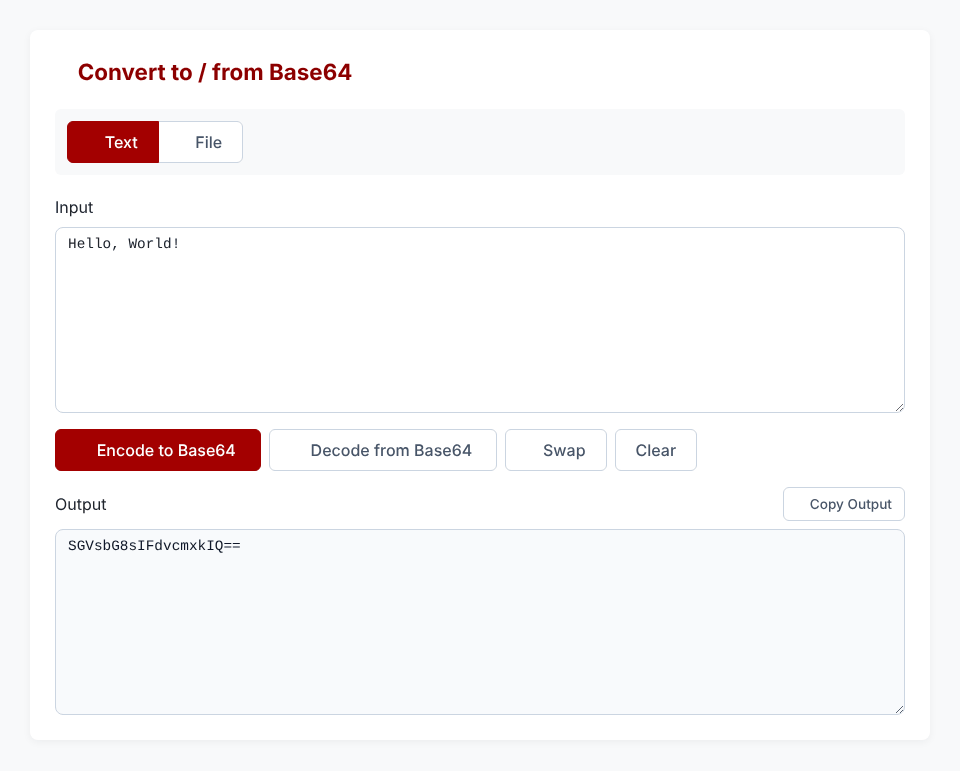
Some reference values you can check against:
Hello, World!      →  SGVsbG8sIFdvcmxkIQ==
admin:password123  →  YWRtaW46cGFzc3dvcmQxMjM=
{"alg":"HS256"}    →  eyJhbGciOiJIUzI1NiJ9   (a typical JWT header)
If decoding fails, the tool shows Invalid Base64 string — please check your input. The usual causes are covered in the mistakes section.
Why Base64 makes data about 33% bigger
Three bytes become four characters, so output is always 4/3 the size of the input, rounded up to a multiple of 4 because of padding. Hello, World! is 13 bytes and encodes to 20 characters. Decoded back, it is exactly 13 bytes again, so nothing is lost, but anything you embed as Base64 costs a third more bandwidth and storage. That is the main reason not to Base64-encode large files into JSON or HTML unless you have to.
Text that is not plain English: the Unicode trap
Base64 works on bytes, not characters, so the first question for any text is: which bytes? The answer is the character encoding, and the modern, correct choice is UTF-8. Our tool encodes text as UTF-8, which means accented letters, symbols and emoji work:
héllo ✓ → aMOpbGxvIOKckw== (10 bytes in UTF-8 → 16 characters)The common bug is in code, not in the tool. The plain JavaScript function btoa() only accepts characters up to code point 255, so btoa("héllo ✓") throws an InvalidCharacterError. And when the input happens to fit, btoa uses Latin-1 rather than UTF-8: héllo gives aOlsbG8= through btoa, but aMOpbGxv as UTF-8. Both are valid Base64, yet they decode to different bytes. If a system you send data to expects UTF-8 (nearly all do), the Latin-1 version will show up as garbled text.
The rule of thumb: when a Base64 string decodes to odd characters like é, the two sides disagree about the text encoding. Make both sides use UTF-8.
Need to encode or decode something right now?
Open the Base64 Encoder / DecoderEncoding files and images
Switch the mode to File to encode any file: choose a file, and the tool reads it and shows the Base64 text, with a preview if it is an image. Two options matter:
- Include Data URI prefix — when ticked, the output starts with
data:<mime-type>;base64,so it can be used directly in HTML or CSS, for example<img src="data:image/png;base64,...">. Untick it to get the raw Base64 only (what an API field usually wants). - Copy / Download .txt — copy the result or save it as a text file.

To go the other way, paste the Base64 string into the Base64 String box in File mode, optionally set an Output Filename, and click Decode & Download. A data:...;base64, prefix is accepted, and the tool guesses the file extension from the type (PNG, JPG, GIF, WebP, SVG, PDF, TXT, JSON, ZIP) and falls back to .bin for anything else. For images specifically, the Base64 Image Converter is built for that job.
When to embed an image as a data URI: tiny icons and one-off email images, where saving a request matters more than the 33% overhead. When not to: anything large or reused across pages, because a data URI cannot be cached separately and bloats the HTML.
The mistakes behind most Base64 bugs
URL-safe Base64 versus standard Base64
Standard Base64 uses + and /, which have special meaning in URLs. The URL-safe variant, used in JWTs and many web APIs, replaces them with - and _ and usually drops the = padding. Standard decoders reject it: the string c3ViamVjdHM_X2Q9MT4-Pg makes JavaScript's atob() throw. Replace - with + and _ with / first, and it decodes to subjects?_d=1>>>. If you paste a JWT segment and get an error, this is almost always why. For inspecting whole tokens, use the JWT Decoder.
Missing or extra padding
Padding makes the length a multiple of 4. Many decoders tolerate it being absent: YQ and YWI decode fine to a and ab. But a length that cannot occur in real Base64, such as 5 characters (abcde), is simply invalid, and usually means the string was cut off.
Whitespace and line breaks
Email (MIME) wraps Base64 at 76 characters per line. If you copy from a wrapped source and a strict decoder complains, remove the line breaks and spaces first.
Double encoding
If decoding gives you something that still looks like Base64 (letters, digits, == at the end), the data was encoded twice. Decode it a second time.
Treating it as security
HTTP Basic authentication sends username:password as Base64, and that is why it must only be used over HTTPS. The encoding hides nothing. If you need to protect a password at rest, use a real password-hashing algorithm instead; see our Bcrypt tool.
Is it safe to use an online Base64 tool?
The encoding and decoding in this tool run in your browser using standard web APIs; the text or file you provide is processed on your device. Even so, Base64 strings are often credentials, tokens or private files, so the sensible habit applies to any website: do not paste live secrets. If you must handle sensitive material, the command line does the same job locally: printf 'text' | base64 to encode and base64 -d to decode on Linux and macOS.
Quick answers
Is Base64 encryption? No. Anyone can decode it instantly; it provides no secrecy.
Why does my encoded string end in =? That is padding. One or two = signs fill out the last group of 4 characters when the input length is not divisible by 3.
Why is the output longer than the input? Base64 uses 4 characters for every 3 bytes, a fixed 33% overhead.
Can I use Base64 in a URL? Use the URL-safe variant (- and _), or percent-encode the standard one with the URL Encoder.
Need to encode or decode something right now?
Open the Base64 Encoder / Decoder