A 2D barcode stores data in a grid of squares or in stacked rows of bars instead of a single row of lines. That lets a few millimetres of print carry a serial number, a shipping reference or a short record, and it lets the scanner recover the data even when part of the symbol is scuffed. Our 2D Barcode Generator offers three of these formats: Data Matrix, PDF417 and Aztec Code. This guide explains what each is for, how to use the tool, and what we found when we generated codes and then tried to read them back with a decoder (ZXing, an open-source reader).
Some of those findings are not flattering to the tool, and a barcode that looks right but does not scan is worse than no barcode. So the guide says plainly which formats and sizes decoded correctly and which did not.
Data Matrix, PDF417 and Aztec: what each is for
- Data Matrix is a small square (or rectangular) grid with a solid L-shaped edge on two sides. It is common on electronic components, medical devices and parts that carry a serial number, because it stays readable at very small sizes.
- PDF417 looks like a stack of short barcodes. It is wide and short, and is used on boarding passes, driver licences and shipping documents, where there is room for a long, thin symbol and a lot of data.
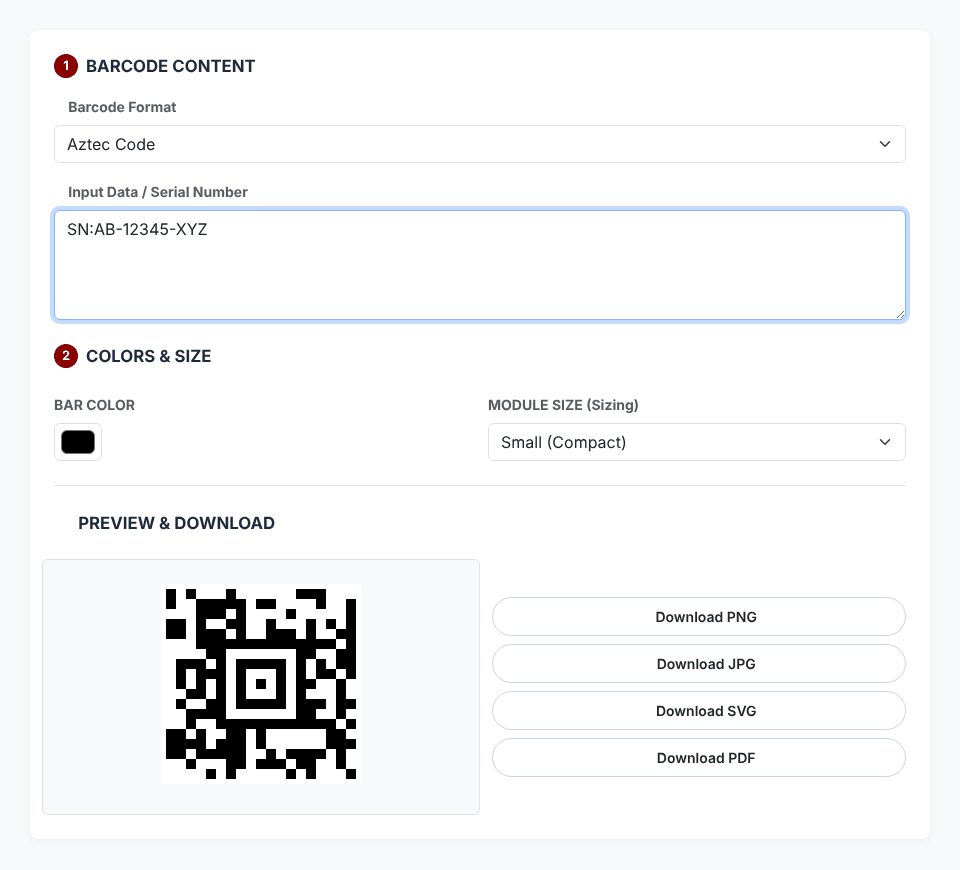
- Aztec Code has a square bullseye in the middle and needs no blank border around it. It is used for tickets, often scanned from a phone screen.
If you want a code that ordinary phone cameras read, the answer is usually a QR code, not any of these. Use our QR Code Generator for that. And if the scanner you are feeding is an old laser gun that reads a single row of bars, you need a line barcode, because a laser scanner generally cannot read a 2D symbol. 2D codes need an imager or camera.
How to generate one, step by step
- Under BARCODE CONTENT, pick a Barcode Format: Data Matrix, PDF417 or Aztec Code. The tool opens with Data Matrix selected and the text
2026-BARCODE-TESTalready filled in. - Type or paste your text into Input Data / Serial Number. The preview updates as you type; there is no Generate button.
- Under COLORS & SIZE, choose a BAR COLOR and a MODULE SIZE: Small (Compact), Medium (Standard) or Large (High Res). A module is one square of the grid, and these three options draw it 5, 10 or 15 pixels wide.
- Use Download PNG, Download JPG or Download PDF. The files are named after the format:
datamatrix.png,pdf417.pngoraztec-code.png, and likewise for JPG and PDF. - Scan the file you downloaded, not just the preview, with the device that will read it in real life.
What actually scanned: our test results
We drove the tool in a real browser, took the canvas it draws, and fed that exact image to ZXing. We tried all three formats at all three sizes with text ranging from one character to 2,000. Here is what came out.
PDF417: reliable
PDF417 decoded correctly at every size for everything from one character up to 800 mixed letters and digits, including a two-line text, an accented and Japanese string (Café ✓ 日本) and a GS1-style string with brackets. It did not read back correctly at 1,500 characters, and the symbol had become 4,430 pixels wide at Medium size by then. Keep PDF417 payloads short.
Aztec Code: reliable
Aztec Code decoded correctly at all three sizes for texts of 10, 50, 100, 200 and 500 characters, as well as for URLs, numbers and punctuation. The symbol is drawn with square modules on a square canvas, so larger payloads simply produce a larger square. Larger codes need a larger module size to stay easy to scan, so check the downloaded file with your scanner.
Data Matrix: reliable
Data Matrix is the format selected when the page loads, and it decoded correctly at all three sizes for every input we tried: the default text 2026-BARCODE-TEST, a four-character text, 16 digits, 50 and 100-character texts, 500 characters, a URL, and a sentence with spaces and punctuation. The symbol is always a complete square with a white margin of about two modules on each side.

Even so, scan a sample of your downloaded file before you print a full run of labels. For a general-purpose code that a phone can read, a QR code is usually the safer pick, and PDF417 works well here when you need a taller, wider 2D format.
Colours
The tool lets you change the bar colour but not the background, which is always white. In our decoding test, Aztec and PDF417 read correctly in black, red (#cc0000), dark blue (#1a3a8a), mid grey (#888888), light grey (#cccccc) and yellow (#ffff00) on white. That does not mean they are all good ideas: contrast is what a scanner needs, and scanners that use red light can have trouble with red or yellow bars. Stay with black or a dark blue for anything that will be scanned in a warehouse.
Errors and limits
When the data does not fit, a red message appears under the input: Could not generate this barcode. The entered data may not be valid for the selected format, followed by the format name. In our tests with mixed letters and digits, that message first appeared at about 1,870 characters for Data Matrix, 1,230 for Aztec Code and 5,700 for PDF417. Those thresholds depend on the content, so treat them as ballpark figures, and remember that a code can render without any error long before it is easy to scan.
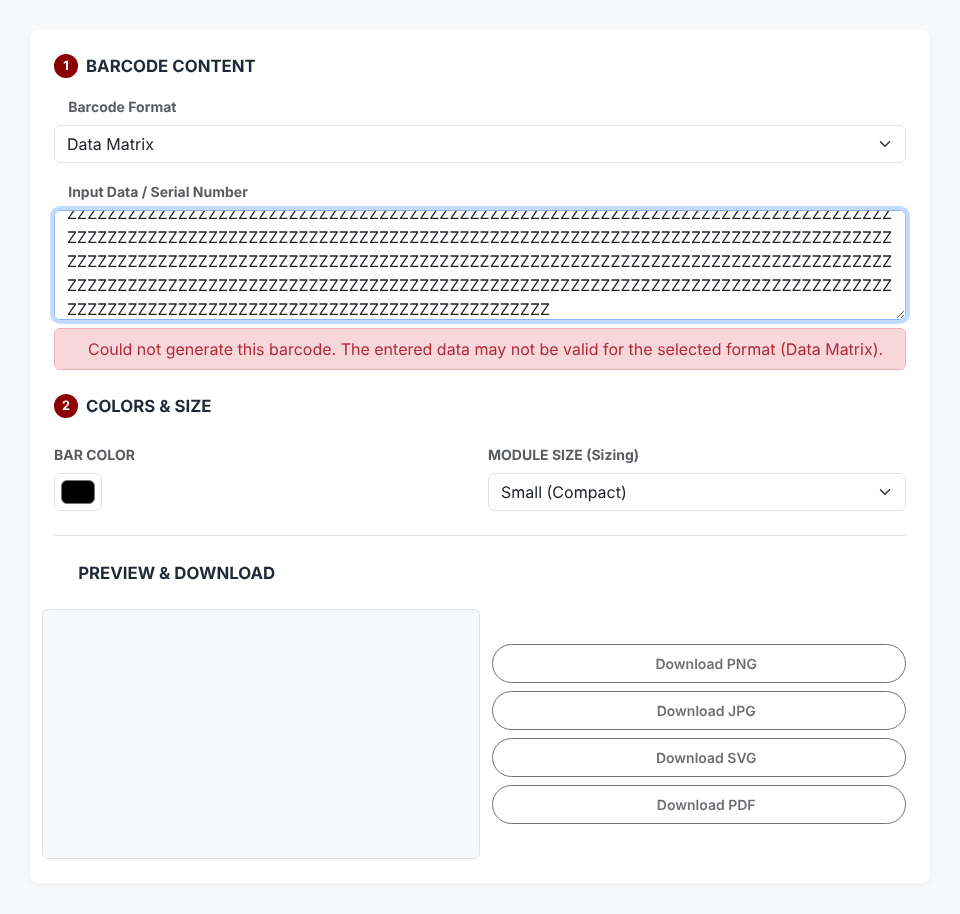
When the error appears, the preview is emptied and the download buttons are greyed out, so an old image cannot be saved by mistake. Clearing the input box does the same. Edit the text until the message disappears and the preview and buttons come back.
The download buttons, honestly
- PNG, JPG and PDF work. JPG gets a solid white background. The PDF is a single page sized to the image plus a small margin, in landscape orientation.
- SVG downloads a file (
datamatrix.svg,aztec-code.svgorpdf417.svg) that wraps the same picture you see in the preview inside an SVG container. It opens in a browser and decoded correctly in our test after we rendered it, but it is a picture of the code, not scalable vector shapes, so it does not stay sharp at any size the way true vector art would.
Privacy: what leaves your browser
While we generated and downloaded codes, the page requested only its own files and library files from CDNs (Bootstrap, the barcode library bwip-js and jsPDF). It sent no request containing the text you typed; the only upload code on the page is the feedback form in the Contact tab. If the library CDN is blocked, the tool cannot draw anything, so it is not fully offline.
Quick answers
Which format should I pick? PDF417 for longer text that you have verified by scanning, Aztec for short strings, and Data Matrix only if you confirm the downloaded file scans.
Can a phone read these? Support for these formats varies between camera and scanner apps. Test with the phones your audience actually has.
What about GS1 or error-correction settings? The tool has neither; it exposes only format, text, colour and size.
Ready to generate a 2D barcode?
Open the 2D Barcode Generator