A JSON validator answers one question: can this text be read as JSON? It is the fastest way to find out why a request body is rejected, why a config file will not load, or why an API response breaks your page. This guide covers how to use our JSON Validator, how to read what it tells you, why the error often points a line or two after the real mistake, which pasted-in problems cause the most trouble in practice, and what a "valid" result still does not prove.
Every result below was produced by running the tool. The wording of the error messages comes from a Chromium-based browser (the V8 JavaScript engine); Firefox and Safari phrase some of them differently, but the failing input and the fix are the same.
What the validator checks
The tool hands your text to the browser's built-in JSON parser. If the parser accepts it, the text follows the JSON grammar: braces and brackets balance, strings use double quotes, commas sit between items and nowhere else, and values are strings, numbers, true, false, null, objects or arrays. That is all it checks. It does not know what your data is supposed to contain. A document can be perfectly valid JSON and still be the wrong document for your API.
If you need to check structure and types, you want JSON Schema, which is a separate step covered further down.
How to validate JSON, step by step
- Paste your JSON into JSON Input for Validation.
- Click Validate JSON, or press
Ctrl+Enter(Cmd+Enteron a Mac). - Read the Validation Report. A pass lists four facts; a failure shows the parser's error message.
- Click Copy Report if you want to paste the result into a ticket or chat.
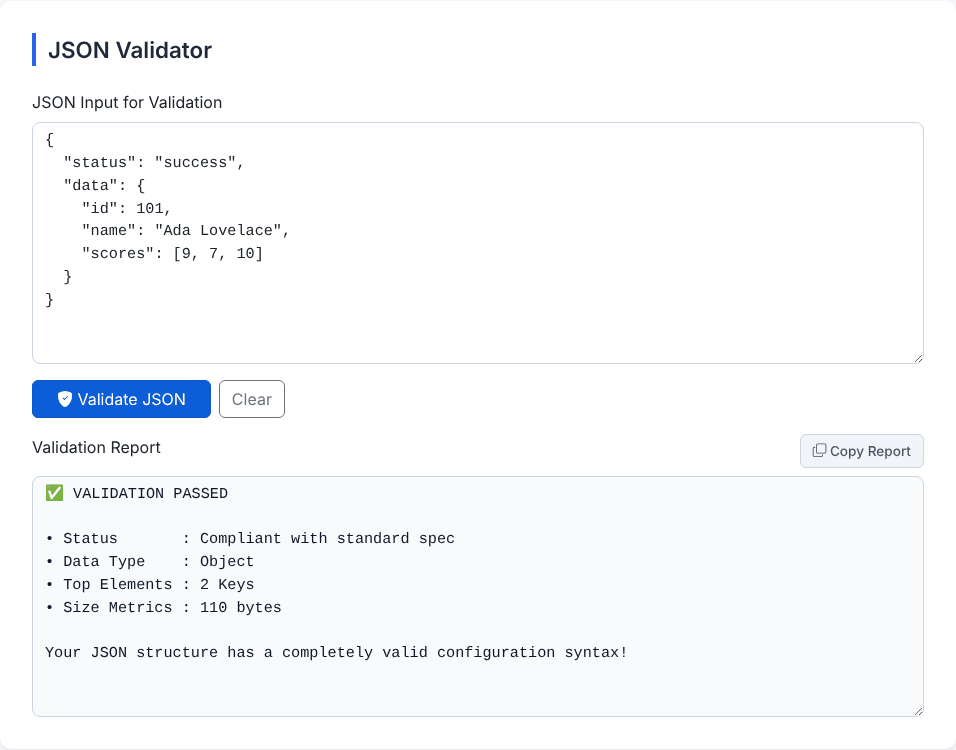
The four lines of a passing report mean:
- Status reads Compliant with standard spec, which is the tool's way of saying the parser accepted it.
- Data Type is the type of the top-level value: Object, Array, string, number, boolean or Null.
- Top Elements counts the keys of a top-level object or the items of a top-level array. It does not count nested content: the example above shows 2 Keys even though it holds more values inside
data. For a top-level string, number ornullit shows 0. - Size Metrics is the size of what you pasted in bytes (UTF-8, ignoring leading and trailing whitespace). In the screenshot it is 110 bytes.
Each run is saved in Validation History (Local), up to the last 20 in your browser's local storage. Click an entry to bring the input and report back.
Why the error often points to the wrong place
A parser reports where it noticed the problem, which is not always where you made it. The classic example is a missing closing bracket. This document has a mistake on line 4 (the array never closes):
{
  "user": {
    "id": 1,
    "tags": ["a", "b"
  },
  "ok": true
}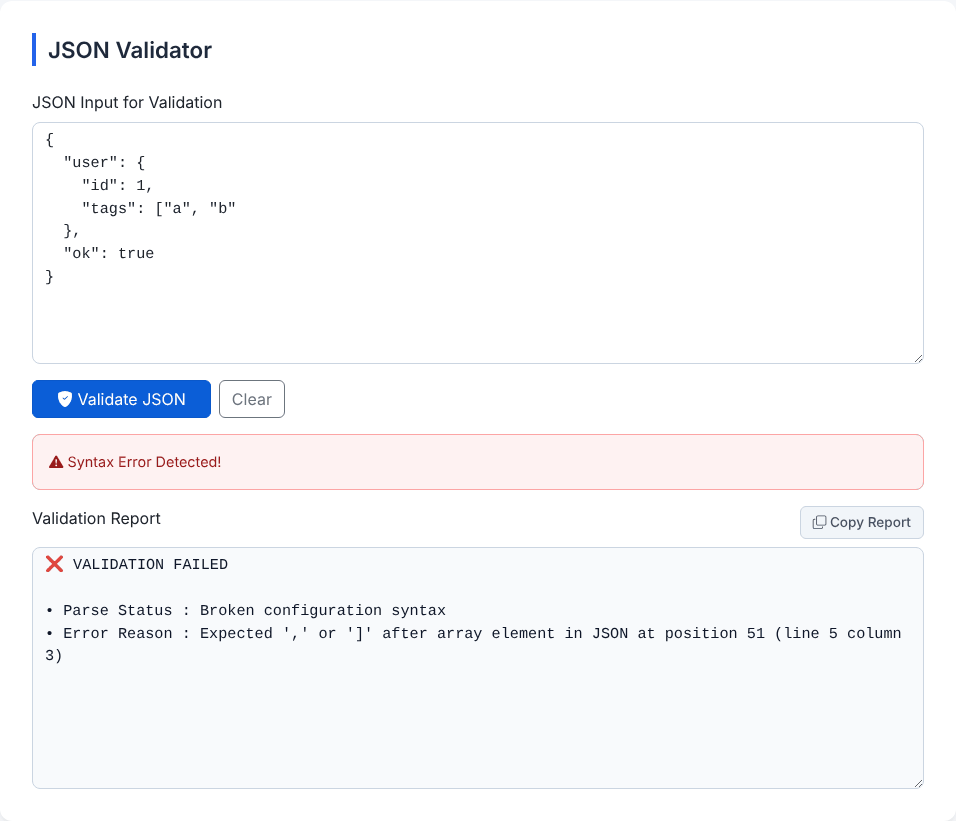
The report says Expected ',' or ']' after array element in JSON at position 51 (line 5 column 3). Line 5 is the } that closes user. The parser was still inside the array, so a brace was the first thing that made no sense. The fix is on the line above: add the missing ]. The rule of thumb is to read the message, look at the reported position, and then look at the last few tokens before it. Position numbers count characters from 0; the line and column are counted from 1.
The tool shows a short Syntax Error Detected! banner above the report, and the actual reason sits in the Error Reason line inside the Validation Report box. Our JSON Formatter guide lists the ten most common syntax slips (trailing commas, single quotes, comments, and so on) with their messages, so this guide concentrates on the problems that come from copying and pasting.
Problems that come from copy and paste
Hand-typed JSON fails in predictable ways. JSON that was copied from somewhere else fails in stranger ones. These are the cases we see most, with what the tool reports:
- Curly (smart) quotes. Text copied from a document, wiki or chat app often has
“and”instead of".{“name”: “Ada”}fails withExpected property name or '}' in JSON at position 1 (line 1 column 2). The message does not say "wrong quote character", so check the first character after a brace when you see this one. - A non-breaking space. A space copied from a web page may be U+00A0, which looks normal but is not JSON whitespace.
{"a": 1}with such a space givesUnexpected token ' ', "{"a": 1}" is not valid JSON, and the quoted token looks like an ordinary space. Retype the space, or search for the character. - Python or JavaScript literals.
{"ok": True}fails atTrue:Unexpected token 'T', "{"ok": True}" is not valid JSON.None,undefinedand single-quoted keys fail the same way. A printed Python dictionary is not JSON; serialise it withjson.dumpsinstead. - Several documents in one box. Log files and exports often have one JSON object per line (JSON Lines). Pasting two lines
{"id":1}and{"id":2}givesUnexpected non-whitespace character after JSON at position 9 (line 2 column 1). Validate one line at a time. - Placeholder dots. Documentation often shortens arrays with
....{"items":[1,2,...]}fails withUnexpected token '.', "{"items":[1,2,...]}" is not valid JSON. Delete the ellipsis. - An HTML error page. When an API call fails and a gateway returns a web page, the body starts with
<:Unexpected token '<', "<!DOCTYPE "... is not valid JSON. This is the classic Unexpected token < from a front-end app; the JSON is fine, the response was not JSON at all. Check the status code and the Content-Type header. - Windows paths and other backslashes. A backslash must be doubled inside a string.
{"path":"C:\Users\ada"}givesBad escaped character in JSON at position 12 (line 1 column 13). WriteC:\\Users\\ada. The same message appears for\x41, which JSON does not support (use\u0041). - Number formats that other languages allow.
0x1F,+1,.5,5.andInfinityare all rejected. For example{"a":5.}givesUnterminated fractional number in JSON at position 7 (line 1 column 8).
One case goes the other way. A byte order mark (BOM) at the very start of a file, the invisible character some editors add to UTF-8 files, makes strict parsers reject the document. The validator accepts it, because the tool trims whitespace-like characters from both ends before parsing, and the BOM counts as one of them. We pasted {"a":1} with a BOM in front and it passed with a size of 7 bytes. If a different system rejects a file that this tool accepts, a BOM is a likely suspect.
Want to check a JSON document right now?
Open the JSON ValidatorValid does not mean correct
These all pass, and all can be wrong for the job:
- Duplicate keys.
{"role":"user","role":"admin"}is reported as valid with 1 Keys. The second value silently wins, so a request that includes"role"twice is interpreted differently by different systems. Many linters flag it; this tool does not. - The wrong types.
{"age":"29","active":"true","price":"19.99"}passes. The numbers and the boolean are strings, which will break any code that does arithmetic or checks for a realtrue. - Empty or tiny documents.
{},[],nulland a bare3.14or"hello"are all valid JSON on their own. A bare string comes back as Data Type: string with 0 top elements. - Missing fields. Nothing checks that
idoremailexists. - Very deep nesting. We pasted an array nested 1,000,000 levels deep and the report still said it passed.
The report's wording, Compliant with standard spec and completely valid configuration syntax, refers to syntax only. It is not a statement about your data being right.
Going beyond syntax
To check content, you need rules that describe the expected shape: required fields, allowed types, value ranges. That is what JSON Schema is for. This validator does not apply a schema, but you can get a starting point from a sample document with the JSON Schema Generator and then tighten it by hand. For a quick manual spot check of one value, the JSON Path Tester lets you pull out a specific path such as $.data.items[0].id and see whether it exists.
A sensible routine for API work is: check that the response is JSON at all (this tool), then check that it has the fields you rely on (a schema or a few path checks), and only then write the code that consumes it. When a response suddenly stops parsing, validating a saved copy often shows within seconds that the cause was an HTML error page, a truncated body or an extra character at the end.
Privacy: what happens to the text you paste
We loaded the validator and ran dozens of documents through it while watching network activity. After the page had loaded, it made no requests. The checking is done by your browser. The page does fetch its styling from a public CDN when it opens, and, as on most free sites, third-party advertising can appear on it. Neither receives your input from our code. Even so, remove tokens, passwords and personal data from anything you paste into any website, or validate it locally with jq empty file.json (it exits with an error code when the file is not valid JSON) or python3 -m json.tool file.json.
The history described above keeps the first 500 characters of each input in your browser's local storage until you press Clear All.
Quick answers
Does it fix the JSON for me? No. It reports the first problem the parser meets and stops there. After you fix it, validate again, because there may be more.
Why does it only show one error? The browser's parser stops at the first failure and the tool shows that message. Fix, re-run, and repeat.
Does it support comments or JSON5? No. It follows the JSON standard, so comments, single quotes and trailing commas fail.
I want it nicely indented as well. Use the JSON Formatter, which validates while it formats.
Want to check a JSON document right now?
Open the JSON Validator