A Content Security Policy (CSP) is a response header that tells the browser which sources a page may load scripts, styles, images and other resources from, and what it may do with forms and frames. If an attacker manages to inject a <script> tag into your HTML, a good policy makes the browser refuse to run it. A bad or half-finished policy, on the other hand, either protects nothing or breaks your own site. This guide shows how to build a policy with our Content Security Policy (CSP) Generator, how to test it without breaking visitors, and which mistakes to avoid. We checked the behaviour described here by serving test pages with these policies in Chromium and reading the browser's responses.
One note first: a CSP is a second line of defence. It limits the damage of an injection bug; it does not replace escaping output and validating input.
How a policy is written
A policy is a list of directives separated by semicolons. Each directive names a type of resource and lists the sources allowed for it, separated by spaces:
default-src 'self'; script-src 'self' https://cdn.jsdelivr.net; img-src 'self' data:; object-src 'none'Two kinds of source appear in the list, and they are written differently:
- Keywords are wrapped in single quotes:
'self'(your own origin),'none','unsafe-inline','unsafe-eval','nonce-...','sha256-...'and'strict-dynamic'. - Hosts and schemes are written bare:
https://cdn.example.com,*.example.com,data:.
Mixing these up is the classic silent failure. We served a page with script-src self (no quotes): the browser treated self as a host name, so the page's own scripts were not allowed. The generator helps by adding the quotes for the keywords it knows, as described below.
default-src is the fallback for every fetch directive you do not set. If you set script-src, it replaces default-src for scripts; the two are not merged. A few directives, such as frame-ancestors, base-uri and form-action, do not fall back to default-src at all, so you need to set them yourself if you want them restricted.
Building a policy with the generator
- Under Directives, type the allowed sources for each directive you need, separated by spaces. A directive left empty is omitted from the policy.
- Under Delivery Options, choose HTTP Header or HTML Meta Tag as the output format, and decide whether to turn on Report-Only mode.
- Read any warnings that appear above Generated Policy.
- Click Copy and add the result to your server or page.
The tool offers 14 directives: default-src, script-src, style-src, img-src, font-src, connect-src, frame-src, frame-ancestors, object-src, base-uri, form-action, media-src, worker-src and report-uri. It starts with a conservative default filled in, which produces:
Content-Security-Policy: default-src 'self'; script-src 'self'; style-src 'self'; img-src 'self' data:; object-src 'none'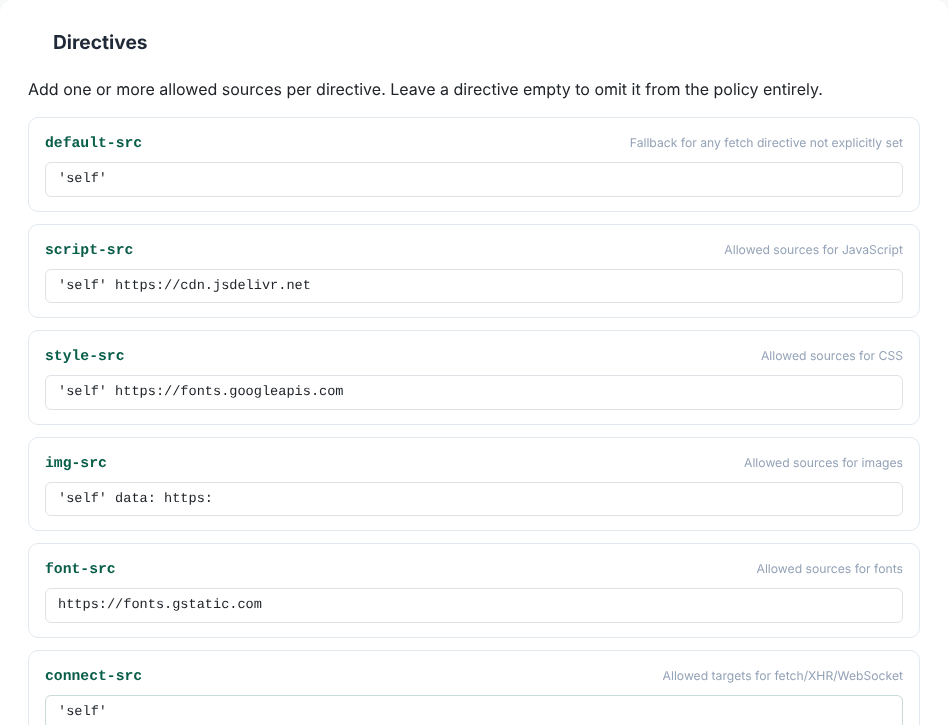
You can type keywords with or without quotes: self and 'self' both come out as 'self'. The tool recognises self, none, unsafe-inline, unsafe-eval, unsafe-hashes, strict-dynamic, report-sample, and anything starting with nonce-, sha256-, sha384- or sha512-. For example, entering self nonce-r4nd0m 'strict-dynamic' sha256-abc123= produced 'self' 'nonce-r4nd0m' 'strict-dynamic' 'sha256-abc123='. Output follows the tool's directive order, not the order you filled them in.
Test first: Report-Only mode
The most important habit when adopting CSP is to not enforce on day one. Turning on the Report-Only mode switch changes the header name to Content-Security-Policy-Report-Only. The browser then evaluates the policy and records violations, but blocks nothing. With a realistic policy, the tool produced:
Content-Security-Policy-Report-Only: default-src 'self'; script-src 'self' https://cdn.jsdelivr.net; style-src 'self' https://fonts.googleapis.com; img-src 'self' data: https:; font-src https://fonts.gstatic.com; connect-src 'self'; object-src 'none'; base-uri 'self'; form-action 'self'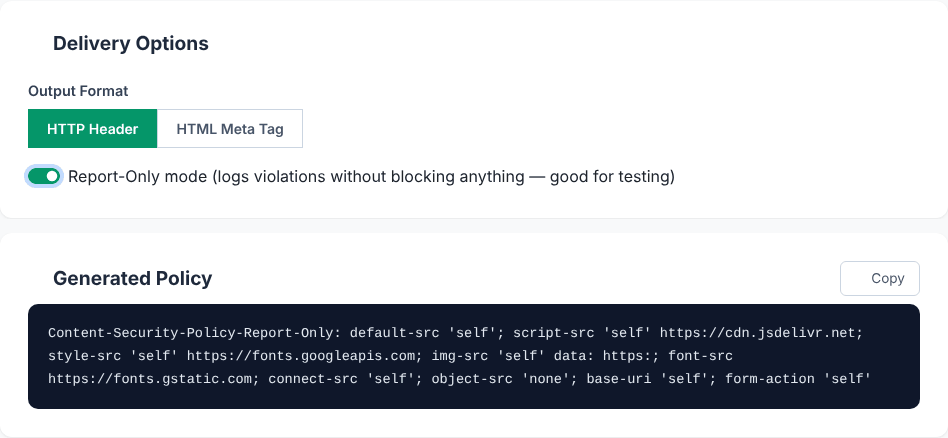
We tested the difference. A test page with one inline script, one inline style and one image from another origin was served three ways. With no policy, everything ran. With the default policy as an enforcing header, the inline scripts were refused, the inline style was not applied (style-src 'self' blocks inline style attributes too), and the cross-origin image was refused. With the same policy as Report-Only, all of it still worked, and the browser logged each problem with a "[Report Only]" prefix in the console and fired a securitypolicyviolation event with a disposition of "report".
A sensible rollout:
- Deploy the policy as Report-Only and browse your whole site, including logged-in pages, checkout and embeds. Open the browser console and look for the violation messages.
- Fix each violation: allow the legitimate source, or remove the inline code that triggered it. Chromium's message for a blocked inline script includes the SHA-256 hash that would allow exactly that script, which is handy for static inline code.
- To collect violations from real visitors, set a reporting endpoint (the tool has a
report-urirow), and review the reports for a while, because real traffic includes browser extensions and third-party scripts you will not see yourself. - When the reports are quiet, switch the header name to
Content-Security-Policy(turn Report-Only off) and deploy.
Draft your policy and test it in report-only mode
Open the CSP GeneratorWhy 'unsafe-inline' defeats the purpose
When your site breaks under a strict policy, the quick fix is to add 'unsafe-inline' to script-src. It works, and it also re-allows exactly what an XSS attack needs: an injected inline script. Adding it in the tool triggers this warning: 'unsafe-inline' in script-src significantly weakens XSS protection — consider using a nonce or hash instead if possible. The tool warns for 'unsafe-inline' and 'unsafe-eval' in any directive. We confirmed the effect: with script-src 'self' 'unsafe-inline', our injected inline script ran.
The better options are:
- Move inline code into external files served from your own origin. This is the simplest and most robust fix.
- Use a nonce. The server generates a fresh random value for every response, puts it in the header as
'nonce-VALUE', and addsnonce="VALUE"to each legitimate script tag. In our test, a script with the matching nonce ran while a plain inline script was refused. A nonce must change on every response; the generator can only print a nonce keyword into the policy, so a fixed value pasted into a static header provides no protection. - Use a hash for inline code that never changes:
'sha256-...'allows only the script with exactly that content.
When a nonce or hash is present in a directive, modern browsers ignore 'unsafe-inline' in that same directive, so you can keep it as a fallback for very old browsers. Pair a nonce with 'strict-dynamic' if scripts need to load other scripts; browsers that support it then ignore host allowlists in that directive.
Treat *, https: and data: as warning signs in script-src as well. They allow so many origins that an attacker can usually find a way to host a script. The tool does not warn about these, so check for them yourself. data: in img-src is fine and common.
Header or meta tag?
The HTTP header is the complete way to deliver a policy. A <meta http-equiv="Content-Security-Policy"> tag works when you cannot set headers (some static hosts), with limits. The generator's meta output looks like:
<meta http-equiv="Content-Security-Policy" content="default-src 'self'; script-src 'self'; style-src 'self'; img-src 'self' data:; object-src 'none'">The CSP specification says frame-ancestors, report-uri and sandbox are ignored in a meta tag, and that Report-Only cannot be delivered that way. Chromium agrees: with those directives in a meta policy, its console says "The Content Security Policy directive 'frame-ancestors' is ignored when delivered via a <meta> element", and the same for report-uri. The generator shows a matching warning in meta mode. Also place the meta tag as early in <head> as possible, before any script or resource it should govern.
Report-Only plus meta. If you switch to HTML Meta Tag while Report-Only is on, the tool shows a warning but still prints a normal enforcing <meta http-equiv="Content-Security-Policy" ...> tag. Do not paste that expecting a dry run: it would enforce the policy. For testing, use the HTTP header.
On Apache or Nginx you add the header in server configuration, for example Header always set Content-Security-Policy "..." on Apache or add_header Content-Security-Policy "..." always; on Nginx. The .htaccess Generator and Security Headers Generator cover the neighbouring headers.
Real-world pitfalls
- Inline styles break. The default
style-src 'self'blocks<style>blocks andstyle="..."attributes, and many frameworks and widgets use them. Allow what you need, ideally with a nonce or hash rather than'unsafe-inline'. - Third-party fonts, analytics and embeds. Google Fonts needs
https://fonts.googleapis.cominstyle-srcandhttps://fonts.gstatic.cominfont-src. API calls from JavaScript needconnect-src; embedded videos needframe-src. - Wasm. WebAssembly needs the
'wasm-unsafe-eval'keyword. The generator does not recognise it as a keyword, so it printswasm-unsafe-evalwithout quotes. We tested both forms: with quotes, a WebAssembly module compiled; without quotes, it was refused. If you need it, add the quotes by hand in the copied policy. The same applies to newer keywords the tool lacks, such as'inline-speculation-rules'. - Keyword case. The tool only quotes lowercase keywords. If you type
SELFit is printed unquoted, which a browser reads as a host. - Missing directives. The tool does not offer
report-to,upgrade-insecure-requests,script-src-elemand others. Add them to the copied header if your setup needs them.report-uriis the older reporting mechanism; newer setups usereport-towith aReporting-Endpointsheader. - Embedding control.
frame-ancestors 'none'stops other sites framing yours, replacing the olderX-Frame-Options. It only works in the header, and it does not fall back todefault-src.
One cosmetic bug in the tool: the descriptions beside object-src and base-uri contain literal tag names that the page treats as HTML, so those words disappear. We saw Allowed sources for / (commonly 'none') and Restricts URLs usable in a tag. It does not affect the generated policy.
Privacy
The policy is built in your browser from what you type. The tool's code makes no network requests other than the optional feedback form, and the policy text itself is not sent anywhere.
Quick answers
Will a CSP stop all XSS? No. It reduces the impact of many injection bugs, particularly with nonces or hashes, but a permissive policy gives little protection. Keep escaping output.
Can I send two policies? Yes. The browser enforces each enforcing policy, so the result is at least as strict as the strictest one, and Report-Only policies are evaluated alongside them without blocking.
Draft your policy and test it in report-only mode
Open the CSP Generator