A language model reads and writes in tokens, not words, and every model can hold only so many tokens at once. The LLM Context Window Estimator takes pasted text or an uploaded file, counts its tokens, and shows how much of five reference window sizes that text would use. This guide explains exactly how the count is produced, how the percentages are worked out, what real text looks like in tokens, and why the number you see here may differ from the one your model reports.
How the tool counts tokens
We read the tool's code. It uses the gpt-tokenizer library (version 2.9.0), a JavaScript implementation of the byte-pair-encoding tokenizer called cl100k_base, which is one of OpenAI's published encodings. The library is downloaded from a public CDN (unpkg) when the page loads, and the counting then runs in your browser. This is a real tokenizer, not a rule of thumb. In our tests the tool's token counts were identical to those we got by running the same library from a local copy, on seven different texts.
Two caveats follow. First, running the same package only confirms that the page uses it correctly, not that its encoding matches every model. Second, cl100k_base is one tokenizer. Models from other vendors, and newer models from the same vendor, may split text differently (we measure the size of that difference below).
If the tokenizer cannot load (for example if the CDN is blocked), the tool falls back to ceil(characters / 4) and marks the token figure with "(est.)". We tested this by blocking the library: a 388-character paragraph showed "97 (est.)" instead of 80. Note that the fallback label appears only on the token count in the statistics bar; the five window rows below do not repeat it.
Using the tool
- Paste text into "Your Text or Document", or drop or choose a file (
.txt,.md,.markdown,.csvor.pdfin the file picker). - Read the three counters under the box: characters, words (anything separated by whitespace) and tokens. They update about 0.3 seconds after you stop typing.
- Set Reserve for Model's Response (tokens). The default is 2000.
- Read Context Window Usage: one bar per window, each with a "Fits" or "Over limit" badge and a line of detail.
How the fit percentage is calculated
The tool's list of reference windows is 8K, 32K, 128K, 200K and 1M, treated as exactly 8,000, 32,000, 128,000, 200,000 and 1,000,000 tokens. The tool notes that a specific model may use a different figure, so check your own model's documentation. For each window:
available for input = window − reserved tokens   (never below 0)
percent used        = tokens / available × 100
fits                = tokens ≤ available
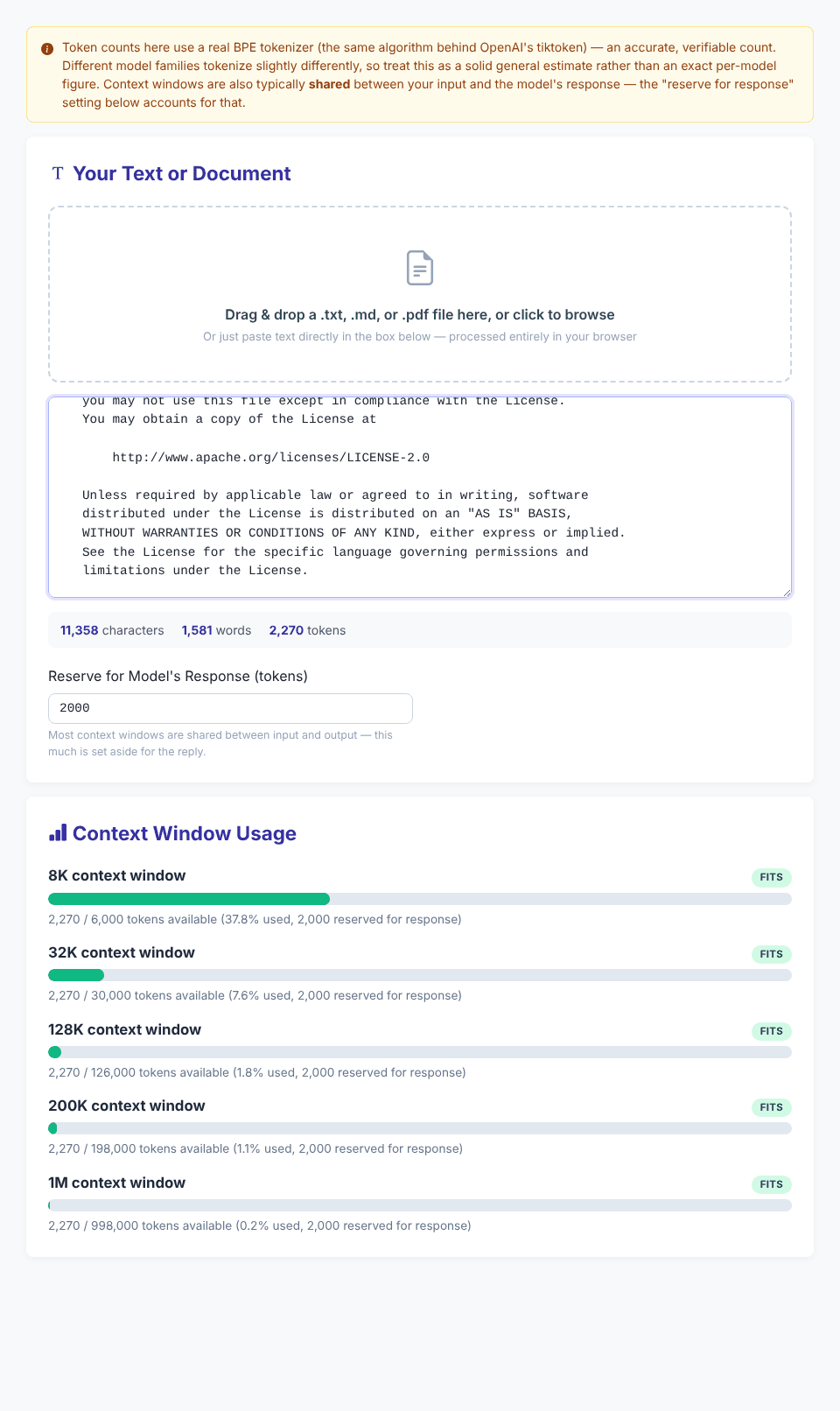
With the Apache license text (2,270 tokens) and the default reserve, the 8K row reads "2,270 / 6,000 tokens available (37.8% used, 2,000 reserved for response)". That is 2,270 ÷ 6,000, not 2,270 ÷ 8,000. Reserving space changes the denominator, which is why the same text can fit in one case and not in another. With two copies of a Python file (6,252 tokens), the 8K row shows "Over limit" at 104.2%, while the 32K row shows 20.8% used.
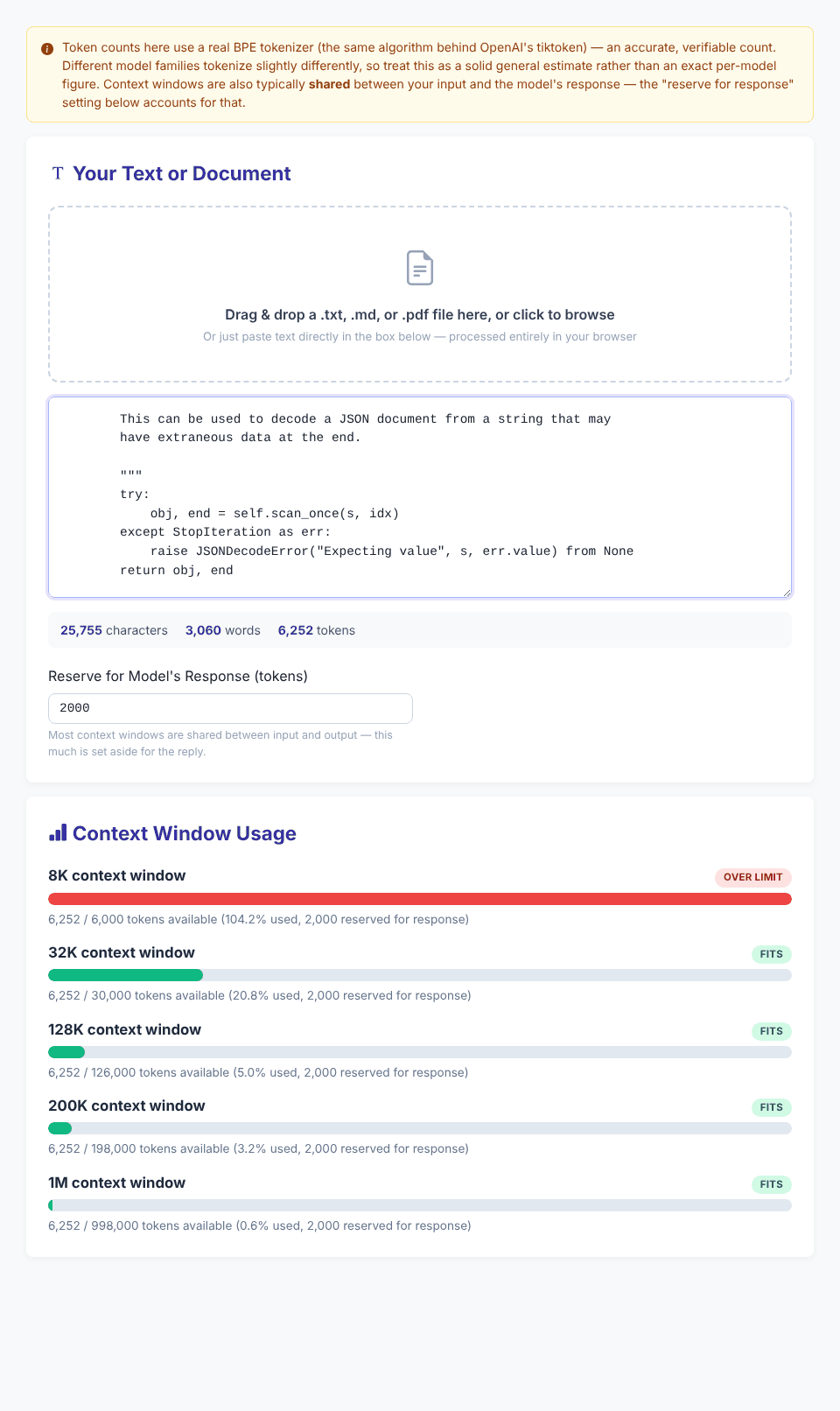
The bars change colour at set points in the code: low below 70%, medium from 70%, high from 90%, and red above 100%.
Check your own text
Open the LLM Context Window EstimatorChoosing the reserve
The reserve stands for everything that has to share the window with your text besides your text: the model's answer, and often your instructions and earlier messages as well. The tool's own note says that the full conversation and system prompts also count and that the reserve only approximates them. A few edge cases we tested:
Reserve        8K row for a 6,252-token text
0              Fits, 78.1% used of 8,000
2000 (default) Over limit, 104.2% of 6,000
8000           Over limit, "6,252 / 0 tokens available (100.0% used)"
-100 or empty  treated as 0
1500.7         treated as 1500
Once the reserve is as large as the window, nothing is left for input, and the row shows 100.0% together with "Over limit". A long answer needs a bigger reserve than a short one, so choose it from the answer you expect, not from habit.
What real texts look like in tokens
We pasted seven samples into the tool. The counts below are what the tool showed; the ratios are our arithmetic. "Words" is the tool's whitespace-based word count.
Sample                           Chars   Words  Tokens  Chars/token  Words/token
English paragraph (ours)           388      72      80      4.85         0.90
Spanish paragraph (ours)           396      68     113      3.50         0.60
Japanese paragraph (ours)          141       1     153      0.92         0.01
Apache 2.0 license (legal)      11,358   1,581   2,270      5.00         0.70
Python file (json/decoder.py)   12,877   1,530   3,126      4.12         0.49
JSON (15 generated records)      2,579     245     819      3.15         0.30
CSV (40 generated rows)          1,687      81     848      1.99         0.10
Three lessons from the table. First, ordinary English prose came out near 0.9 words per token, but a long legal text in English was 0.70, so "English" is not one ratio. Second, code, JSON and CSV take far more tokens per word, because punctuation, indentation, numbers and identifiers split into many pieces. Third, the Japanese paragraph produced more tokens (153) than it has characters (141), and the word counter calls it one "word" because it has no spaces. Do not use the word count for languages written without spaces.
"How many words is 128K tokens?"
The tool does not convert tokens into words, but the samples above give a feel for the range. Taking the tool's 128K as 128,000 tokens and multiplying by the words-per-token column gives roughly 115,000 words for the English paragraph, 90,000 for the legal text, 63,000 for the Python file and 38,000 for the JSON. These come from seven samples only. They show how much the answer depends on content; they are not a general rule.
Why another tool or model may show a different number
To see how much tokenizers can disagree, we ran the same seven texts through two encodings that ship in the same gpt-tokenizer package: cl100k_base (the one the tool uses) and o200k_base.
Sample             cl100k_base   o200k_base   Difference
English paragraph       80           79          -1%
Apache license       2,270        2,263          -0.3%
Python file          3,126        3,162          +1%
JSON                   819          819           0%
CSV                    848          848           0%
Spanish                113           93         -18%
Japanese               153          114         -25%
For English and code the two agreed within about 1%. For Spanish and Japanese the second encoding used 18% and 25% fewer tokens. We could not test the tokenizers of other vendors' models, such as Claude or Gemini, so we cannot tell you how far they differ for your text. The tool itself says "different model families tokenize slightly differently". Our test of a second OpenAI encoding suggests that for non-English text the gap can be larger than "slightly". For a hard limit, use the count from your model provider's own tokenizer or token-counting service, and keep a margin.
For reference, the characters-divided-by-four shortcut was off by -76% (Japanese) to +25% (the license text) on these samples, and by +3% on the Python file. It is an average, not a measurement.
Files, PDFs and their limits
- Text files are read as text and placed in the box. We loaded a
.txtand got identical counts to pasting. - PDFs are read with PDF.js, also loaded from a CDN, which extracts the text on your device. A two-page PDF we generated showed "(2 pages)" and its text was counted. A PDF with only an image gave "No text could be extracted from this PDF — it may be a scanned or image-only document." and a corrupted one gave "Could not extract text from this PDF. It may be password-protected, corrupted, or in an unsupported format." There is no OCR.
- Other files are not rejected. We renamed 1,024 bytes of binary data to
.docxand the tool read it as text and counted 360 tokens of garbage. Only upload files you know are plain text or text-based PDFs. - "Remove file" only hides the file note. The text stays in the box and the counts stay unchanged, so clear the box yourself.
- After a failed PDF the previous file name may stay in the note. Trust the counts and error message rather than the note.
Problems we found
- Text containing
<|endoftext|>breaks the count. That string is a special marker in the tokenizer. If your pasted text contains it (it can appear in material about language models), the page raises "Disallowed special token found: <|endoftext|>". The character and word counters update, but the token figure and the bars keep the previous values. If the numbers do not change after a paste, look for such markers. - The "(est.)" label for the fallback estimate is only shown in the statistics bar, not on the five bars.
What stays on your device
Text and files are processed in your browser, and the page's own code does not upload them. We watched the network requests during our tests: the page loaded its own files, Bootstrap, the tokenizer library from unpkg and PDF.js from jsDelivr. PDF.js is requested when the page opens, and its worker file when a PDF is processed. No request carried our text or files. Because those libraries come from third-party CDNs, the page needs an internet connection to count exactly; otherwise it uses the rough fallback. The site may also show advertising.
Quick answers
Is this the count my model will use? Only if your model uses the same tokenizer. Treat it as a close estimate for OpenAI-style tokenization and a ballpark for other families.
Why does it say "Over limit" with fewer tokens than the window? Because the comparison is against the window minus the reserve, not the full window.
What does 1M mean in the list? The tool uses 1,000,000 tokens. Check your model's documentation for its own limit.
Should I count my instructions too? Yes. Paste them with the text, or raise the reserve. To clean pasted Markdown before counting, try the Markdown to LLM Clean Text Converter. For a simple token count without windows, use the AI Token Counter.
Check your own text
Open the LLM Context Window Estimator