The 50/30/20 rule is a simple way to split your take-home pay: 50% to needs, 30% to wants and 20% to savings and extra debt payments. The calculator's own description credits Elizabeth Warren with popularizing it. Its appeal is that it replaces a spreadsheet of forty categories with three buckets. This guide shows how to use our 50/30/20 Budget Calculator, how to sort your spending into the buckets, and what to do when the numbers do not fit your life.
Note: this is general educational information, not personal financial advice. The percentages are a starting framework, and the tool itself says so.
What the rule says
You start from after-tax income, meaning the money that actually lands in your account after income tax and payroll deductions. That is the figure the tool asks for ("Monthly After-Tax Income"). Then:
- Needs (50%): rent or mortgage, utilities, groceries, insurance premiums, transportation to work and the minimum payments on your debts.
- Wants (30%): dining out, streaming, hobbies, vacations, non-essential shopping and upgrades you chose rather than needed.
- Savings (20%): emergency fund contributions, retirement accounts, investing, and extra debt payments beyond the minimums.
The line between categories is not always clean. A gym membership might be a need for someone managing a health condition and a want for someone else. Be honest rather than moving everything into "needs."
Using the calculator step by step
- Pick a currency (US dollar, euro, British pound or Australian dollar). This only changes the symbol.
- Enter your Monthly After-Tax Income.
- Leave the split at 50 / 30 / 20 or change Needs (%), Wants (%) and Savings (%). A line under the fields shows the running total and must read 100%.
- Optionally fill in your actual spending for each bucket to see the comparison.
Results update as you type. The Your Targets card gives three dollar amounts, and the Target vs. Actual table appears once you enter at least one actual figure.
A worked example
Suppose you take home $4,200 a month. After you review a few months of statements, you find you spend $2,700 on needs and $1,100 on wants, which leaves $400 for savings. The calculator shows:
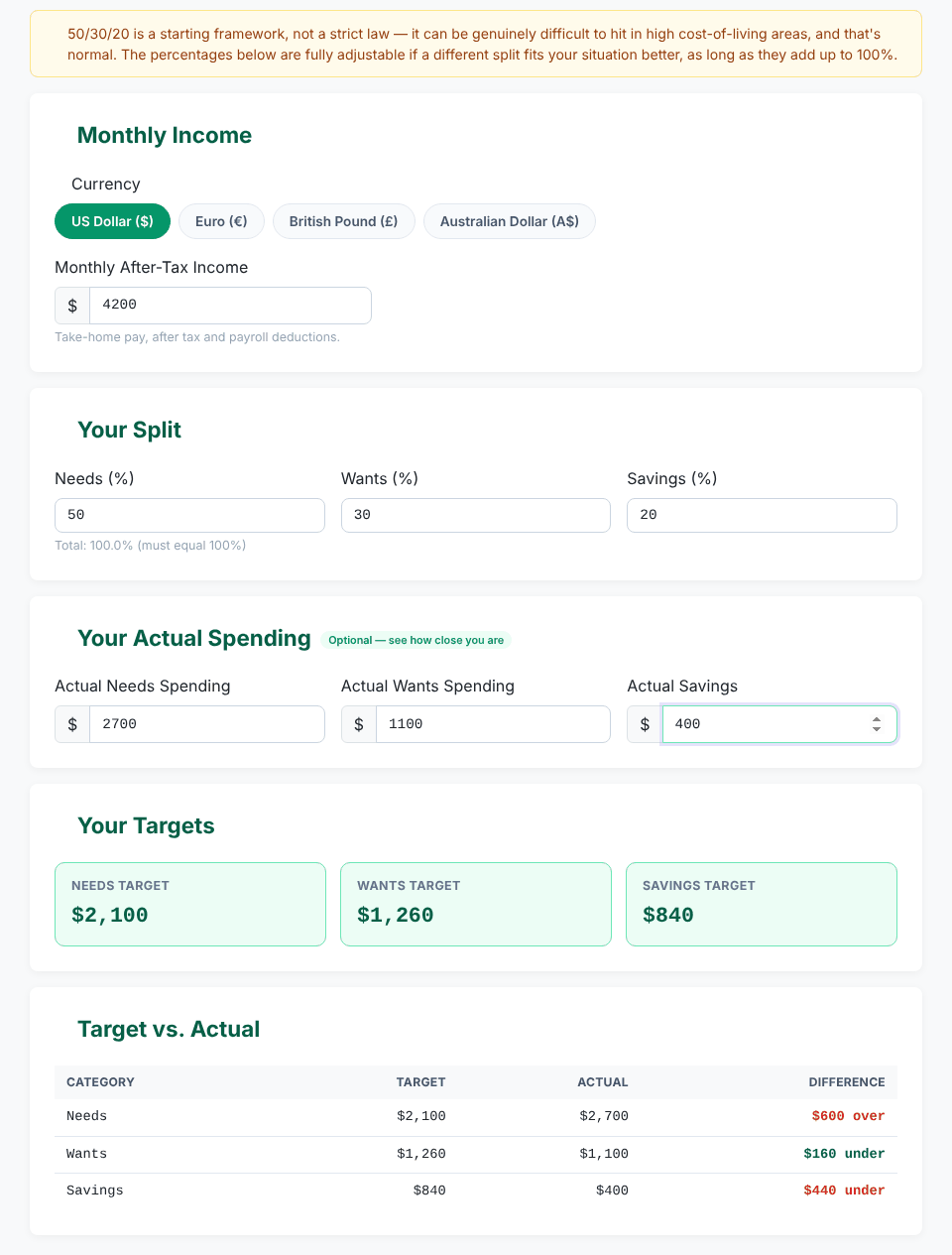
Category   Target   Actual   Difference
Needs      $2,100   $2,700   $600 over
Wants      $1,260   $1,100   $160 under
Savings      $840     $400   $440 under
In the table the needs and savings differences are red and the wants difference is green. The tool treats "over" differently for each bucket: overspending on needs or wants is flagged as bad, while saving more than the target would be flagged as good, and a savings shortfall is flagged as bad. Here needs take 64.3% of income ($2,700 ÷ $4,200), and the savings row absorbs the damage: the $600 of extra needs is only partly offset by wants running $160 under, so savings end up $440 short ($600 − $160). That is the kind of pattern the rule is meant to expose.
If an actual figure matches the target to within half a cent, the row says "Right on target".
Get your three targets in seconds
Open the 50/30/20 Budget CalculatorAdjusting the split for your situation
In high-cost areas, 50% for needs may simply be unrealistic. The calculator accepts any three percentages as long as they total 100%, so use a split you can actually keep. Compare these on a $5,000 income:
Split      Needs    Wants    Savings
50/30/20   $2,500   $1,500   $1,000
60/20/20   $3,000   $1,000   $1,000
70/20/10   $3,500   $1,000     $500
Notice that moving from 50/30/20 to 60/20/20 keeps savings at $1,000 and takes the extra $500 for rent out of the wants bucket. That is usually a more sustainable trade than cutting savings. The same logic works at lower incomes. On $3,200, a 60/20/20 split gives $1,920 for needs, $640 for wants and $640 for savings, and the standard split gives $1,600, $960 and $640.
The same percentages scale with income. On $7,500 the standard targets are $3,750, $2,250 and $1,500. At 20%, $840 a month on a $4,200 income adds up to $10,080 a year before any growth.
What to do when needs run over 50%
- Check the classification. Subscriptions, premium phone plans and a larger car than you need tend to hide in "needs."
- Look at the big three first. Housing, transportation and food usually decide whether the budget works. Small cuts elsewhere rarely make up for a rent that is too high.
- Protect savings first and squeeze wants second, or use a temporary split such as 60/20/20 and revisit it when your income grows.
- Raise income if you can, since expenses cannot fall forever.
If part of your needs is debt, see how fast extra payments could clear it with the Debt Payoff Calculator. The savings bucket is also where an emergency fund comes from; the Emergency Fund Calculator estimates how large that fund should be, and the Savings Goal Calculator helps with other targets.
What the calculator does and does not do
- Percentages must add up to 100%. Otherwise the tool shows "Needs + Wants + Savings must add up to 100%" together with the current total, for example 105.0%. It allows a tolerance of 0.05 points, so 33.3 / 33.3 / 33.4 works and gives $1,665, $1,665 and $1,670 on $5,000.
- Negative percentages or zero income are rejected with a message.
- Blank actual fields count as zero. If you fill in only Actual Savings (say 800), the table also shows Needs and Wants as $0 and "under" target. Fill all three or ignore the unused rows.
- No cross-check against income. The tool does not verify that your three actual figures add up to your income, so make sure they do.
- Whole-currency display. Amounts are rounded to the nearest whole unit on screen.
- Monthly view only. It does not split spending into sub-categories, track months over time or handle irregular income. Use an average month, and for variable income, use a conservative one.
- It does not read your bank data. You type the numbers yourself, and the calculation runs in your browser. The only request the page makes to the server is the feedback form, when you submit it.
Quick answers
Should I use gross or net income? Net, meaning take-home pay. The rule is built for the money you can actually spend.
Do debt payments count as needs or savings? Minimum payments are needs. Anything above the minimum belongs in savings, because it builds your future position.
Are retirement contributions through payroll part of the 20%? If they are taken from your pay before it reaches your account, they are not in your take-home figure. You can add them back to your income and the savings bucket if you want the full picture, as long as you do it consistently.
How often should I check? Compare a month against the targets, adjust, and repeat for a few months. A single month with a car repair or a holiday is not a verdict.
Get your three targets in seconds
Open the 50/30/20 Budget Calculator